Minor - Wallboard under V18 u2

Status
Not open for further replies.

JeremyH

Forum User
Joined
Nov 3, 2020
Messages
19
Reaction score
5
Hi

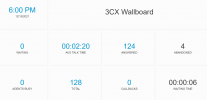
Just been upgraded from V16 to V18 u2, We display the wallboard on a largish TV, we've noticed that the fonts used in the various tiles are now smaller, so some people are now struggling to see some of the values/titles under each tile. Is there a way to tweek the font size, or any other parameters relating to the wallboard, I can only see the option to enter a message and custom message and can't change anything else wallboard related.

Essentially I need to make the text bigger in each box if that's possible.

p.s. we are using the web url to display the wallboard.

Thanks

Jeremy
 
Hi @JeremyH,

If you decrease the resolution of on the largish TV, the Wall Board text should become bigger.

Another option is to use the Windows Zoom function.
 
Hi @VasilisV_3CX

Decreasing the resolution doesn't seem to change the size of the font within each box/tile.

The only windows zoom function I can find is for someone with eyesight problems to interact with the screen and zoom a specific part, which means people interacting with the screen, is there another zoom feature within windows I'm missing?

This screen sits at the front of the room , the people at the front can see it ok, the ones further back now can't.
It doesn't make sense or I can't justify to finance that I now need to purchase a larger TV just because of a version change.

Not sure why there is so much white around each area of text now. Example below.

Thanks

Jeremy


1639591247412.png
 
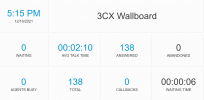
I eventually resolved this by going into the developer tools of Chrome/Edge and turning on local overrides, created a local copy of the styles.c7e5a4f457f10a735dac.css file and changed 6.5vmin to 8.5vmin for the h1 entry, it's the only occurrence of 6.5vmin in this file and changed 2.5vmin to 3.5vmin for the text-muted entry, again it's the only occurrence of 2.5vmin in this file. To get into developer tools press F12 while in chrome/edge, then press F1 and tick the setting Allow local overrides. Hopefully you can tell from the attached screen shot that it's bigger.
 

Attachments

  • Screenshot 2021-12-16 171548.png
    Screenshot 2021-12-16 171548.png
    86.7 KB · Views: 7
@JeremyH ,

Thank you first of all for reporting this. Internally we are checking it, and a permanent fix will be delivered in upcoming updates.
 
Status
Not open for further replies.

Forum statistics

Threads
112,349
Messages
592,027
Members
165,513
Latest member
megalmazan