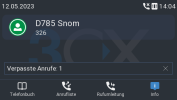
Solved Missed calls bar is shown in white and the "Missed calls" label is also white.

Status
Not open for further replies.

techsupportkoeln

Trial User
Advanced Certified
Joined
Feb 18, 2022
Messages
15
Reaction score
1
Missed calls bar is shown in white and the "Missed calls" label is also white.

What is wrong with the current firmware??
 

Attachments

  • snom.png
    snom.png
    855.1 KB · Views: 13
I thought Snom phones are fully supported by 3CX? When I look at the dark theme, it is not acceptable for customers in the medium term. The readability is simply not given and there are also display errors as described above.

As it currently looks, we have to replace all Snom phones or just 3CX. I tend to replace 3CX because of the cost.
 
Hi,

The dark theme was a Snom decision a few years ago. But hey changed their firmware and the 3CX template to match correctly.

I checked our D785 (v10.1.141.10) and it does not seem to have this issue.

get_attachment_url


Can you please tell me your:

- Model
- Firmware version
- PBX version
- If you use custom templates or not

..and we can check to see if we have the same issue here
 
3CX Server Version: 18.0 Update 7 Build 312
SNOM D785 Firmware 10.1.141.10

We do not use custom templates.

I can reproduce the error by all my customer with Snom Phones. They have all the newest 3CX Version and the SNOM D785 with the newest Firmware.

The missed call bar is only showed if you have missed calls. And then in white and the font "Missed Call 1" also in white.
 
And this appears after just leaving a missed call correct?
 
yes. If they click on the call list, the message disappears.
 
As a test, can we factory reset one of your Snoms and then reprovision it?
This is just so we can be 100% sure that there aren't any leftover old settings, or in case the user changed something in the menus. Then leave a missed call so we can see how the phone will behave.


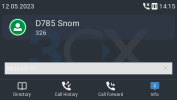
I did the same here using the German language on the phone, fresh provisioning on same PBX and firmware version and it looks ok for now at least:
1683889565467.png

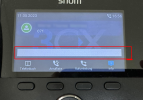
But if I go in the phone menus manually and change the Status Messages Background Color it will look like your example. A reprovisioning will not fix this, you need to fix it manually from the menus again or factory reset and reprovision to get the defaults.
1683890346762.png

I don't think this is a Snom or 3CX issue, it looks like someone probably changed something in the phone menus manually because by default it looks like the missed calls show correctly.
 
thanks for this Information. I will test this next week.

But i don't think that 100 User changed manually the Status Messages Background Color ;)
 
how did you make this "Screenshot" on a real SNOM D785?
 
thanks for this Information. I will test this next week.

But i don't think that 100 User changed manually the Status Messages Background Color ;)
Yes, to be fair I don't think that either but we need to understand what happened.

If you find something we will be very interested to fix it, so when you have a chance take a look and let me know what you find.
 
  • Like
Reactions: techsupportkoeln
I can confirm that a factory reset solved the problem.

It looks like only very old systems that have been updated over the years are affected.
Customers where we have installed 3CX and SNOM in the last 2-3 years are not affected.
 
  • Like
Reactions: JohnS_3CX
Excellent news! Glad to hear the issue is resolved.
 
Status
Not open for further replies.

Members Online Now

Forum statistics

Threads
111,832
Messages
589,278
Members
164,662
Latest member
DejanMDS