Missed calls in the CRM system

balandine

Premier Customer
Joined
Feb 2, 2026
Messages
15
Reaction score
3
Hello everyone.

I have an integration set up between my PBX and the Salesforce system. During testing, the following issue was identified. When a call comes into the call queue and if none of the agents answer the call, it is displayed as missed in the 3CX call history. However, in SF, it is sent as if it was answered. Additionally, there is no link to the call recording (because it didn't actually happen). I reviewed all the queue settings and integration settings to understand the reason for this behavior but couldn't figure out why this is happening.

Can anyone suggest why a "Missed call from..." message is not being sent to SF?

This is what a call in 3CX looks like:

1770730881505.png


And this is the message sent to SF:
1770730949356.png
Here's what the integration setup looks like:
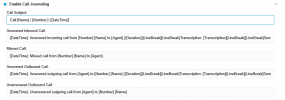
1770731496864.png
 
Hi, and IVR, Call Queue or VM are auto attended destinations, so the calls when are connected to these system extensions are automatically answered, this does not occurs when talking about a Ring Group or if the call goes directly to a user extension.

So it is expected that the call is marked as answered because it was connected in the queue. A call recording is not generated due it is recorded only when a user extension is involved.

Have a good day!
 
That's clear. Thank you for the explanation.

Have a good day.
 
  • Like
Reactions: Alejandro_3CX
Is there a way to transfer "Unanswered" calls status to the CRM? May be CFD is the option? I reviewed the CRM Template XML Description document. But I didn't see a variable there that would contain this data.
 
Is there a way to transfer "Unanswered" calls status to the CRM? May be CFD is the option? I reviewed the CRM Template XML Description document. But I didn't see a variable there that would contain this data.
There are none. Unanswered will never apply to calls going through IVR or queues. Nothing can be done for that.
 
I just see this status in Call Reports and thought I might be able to use it somehow.

Do you have any ideas on how I can differentiate between answered and unanswered calls in the CRM? It's just all calls have "Answered incoming call" message in the comments. I want to automate the creation of tasks for missed calls.
 
I just see this status in Call Reports and thought I might be able to use it somehow.

Do you have any ideas on how I can differentiate between answered and unanswered calls in the CRM? It's just all calls have "Answered incoming call" message in the comments. I want to automate the creation of tasks for missed calls.
You'd need modifications to the template (copy it first) with conditions to check if the Agent variable is empty. If it is, then it is usually a "missed" call.
 
Thank you for the tip. I'll try to explore the configuration file.
 
  • Like
Reactions: Evolute IT
Thank you for the tip. I'll try to explore the configuration file.
If you're unsure, we can help. We work with these templates daily.
 

Members Online Now

No members online now.

Forum statistics

Threads
111,831
Messages
589,277
Members
164,660
Latest member
RJenkinsROCK
