MOH - Playlist Entry Bug

Status
Not open for further replies.

Paul Anderson

Customer
Joined
Jun 25, 2018
Messages
3
Reaction score
0
I'm trying to setup a playlist for music on hold on the latest release of 15.5. We have 8 messages that need to be played in sequence but when populating the playlist after the third file is entered the list box order is corrupted. The files are called 1.wav to 8.wav.

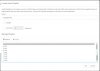
After selected each of the files the listbox has the files in the following order.

4.wav
6.wav
8.wav
7.wav
3.wav
5.wav
1.wav
2.wav

I can't get them in the correct order and I've tried all the major browsers and the behaviour is identical in all.

Is the playlist stored as a file that can be manually edited? Anyone else have this problem?


Regards
Paul.
 
Hello @Paul Anderson

Are your files in the correct audio format? You can convert your files using the guide below.
https://www.3cx.com/docs/converting-wav-file/
I have tried adding 8 files with the same filenames but i am getting them in the order i input them. I am using Google chrome and i am running 15.5 SP5.
 
Hi @YiannisH_3CX,
Thanks for the reply. I'm also on 15.5 SP5 and using latest chrome and still get the random ordering of entries in the playlist creation form. As long as I keep "Shuffle" switch off then upload the files again it doesn't matter that it reorders the list on the screen as 3CX plays them in ascending order from the physical playlist directory. So as long as I name the files in the correct order it doesn't stop me from using the playlist feature, it just becomes a pain if I need to alter the order as I would have to save the files with the correct names and then upload them again overwriting the original files.
It would be nice to have this fixed though.
Paul.
 
I have tried the same scenario on a different system and i am not getting the same behaviour as you. The PBX keeps the files in the order i add them. 2018-06-27_11h41_30.png
Are you using Linux or windows? How large are the files you are uploading ?
 
Hi @YiannisH_3CX ,
Thanks for the reply. I've attached a image of the result I get when I add the files 1.wav to 8.wav to the playlist creation form.
I combined two screen shots to show the full list.
Paul.
 

Attachments

  • playlist.jpg
    playlist.jpg
    81.7 KB · Views: 21
Status
Not open for further replies.

Latest Posts

Forum statistics

Threads
111,887
Messages
589,552
Members
164,747
Latest member
Bastion Advisory