MS Teams presence sync - users on a Teams call

unslog

Customer
Joined
Jun 4, 2024
Messages
15
Reaction score
0
Hello.

Is there a way to enforce 3CX to do not distrub status or similar when a user is on a Teams call?

Received a number of complaints from users receiving 3CX calls in the middle of a Teams meeting.

Running the latest 3CX versions.

See example

Regards
1729167938636.png
1729167742484.png
 
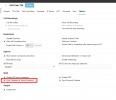
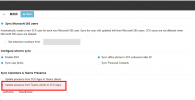
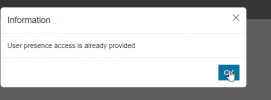
Have you enabled the Presence sync in the M365 config? (Users > M365)
 
Yes, it's been authorised

1729168452757.png
 
TBH I have found the Teams Presence syncing to be hit and miss.
 
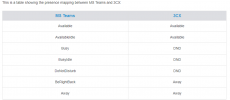
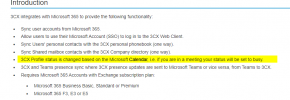
Hi. Regarding your questions, please note the team's presence when on call does not affect the 3cx status. This feature only changes the presence in 3cx when one of the chosen presence settings is set as per the guide.

1729169619242.png
 
Hi, thanks for sharing the table, which I'm already aware of , however it was understood that 3CX would sync with Team calendar and block calls.
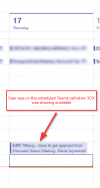
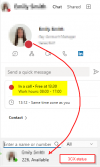
The user was on a pre-scheduled Teams call at the point of receivng the Teams call (as per screenshot).

1729170384525.png
1729170287538.png
Are there plans to refine this behaviour ( to include calls ) , as it's pretty hard to deal with two calls at once :)?
 
To sync status changes between Microsoft Teams and 3CX, make sure of the following:
  1. If you've upgraded from v18 to v20, re-integrate 3CX with M365
  2. Verify that M365 is enabled under Users > M365 in the 3CX console.
  3. Ensure that you have authorized the presence sync so that status changes in Teams will be reflected in 3CX.
This will keep both platforms in sync for status updates.
 
  • Like
Reactions: Evolute IT
Hi, we have already performed steps.

Any further suggestions?

1729183602954.png

1729183627587.png
 
Last edited:
Hello,

same on my side. The presence sync from 3CX -> Teams works, Teams -> 3CX works as well, but take 10 seconds.
Version 20.0 Update 3 (Build 806 Release)
 
Hello,

same on my side. The presence sync from 3CX -> Teams works, Teams -> 3CX works as well, but take 10 seconds.
Version 20.0 Update 3 (Build 806 Release)
If the delay originates from the Microsoft side, where a status change in the Teams app takes 10 seconds to reflect on the 3CX side, it suggests that the request to update the status is being sent from Microsoft with a 10-second delay. Unfortunately, this is beyond our control, and you will need to check with Microsoft to determine the cause of the delay.
 
That suits me, I just wanted to make a comment.

We have the situation that if someone is away in Teams, the status in 3CX also changes to away.
Now it is the case that someone who is not at their workstation computer is set to away and therefore cannot be reached on their phone 3CX client.
How did you solve this? Is it possible to exclude certain presence statuses? Or can you exclude certain users from this presence status sync?
Deactivating idle mode in Teams would not be a solution.
 
Check on the MS side if this is possible to prevent setting away status on teams app, when pc on not used.
 
I had a long conversation with 3cx and explained why it is absolutely nessecary that this stuff is configurable. The alternativ teams sync for 3cx is doing this. But at the moment 3cx doesnt answer regarding this.