Solved Multiple Domain names under one tenant

Status
Not open for further replies.

HIS-Nhenry

Silver Partner
Joined
Apr 7, 2022
Messages
52
Reaction score
3
Good afternoon all,

We have collectively multiple domains under our 1 o365 tenant. We are setting up 3cx v20 to migrate to. My question is how can we get o365 sso integrated with users that are on our domain but have a different domain name? Such as our 3cx is domain1.org, but we also have domain2.com, domain3.org. It only has the o365 sso check box enabled for only the users on domain1.org. All the domain names are under a single tenant ID for o365. Let me know if you have any questions.
 
Hi there, but on the 3CX side, you only have the option to choose the users, and you can't specify the domain there, so basically you are seeing all the users from all of the domains in there but you only wish to add specific and only by domain?
 
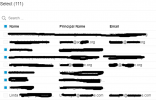
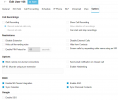
On the 3cx side I can see all my users in every domain under the same tenant when i select the M365 button to select users where you can select the ones you don't want to sync. So 3cx can see all the users. I have attached a picture that is a good example.
The second line is a user on a different domain (the first box unchecked.
The 5th line is the domain that does allow sso with o365.
The last line is also a user on a different domain than the other two that doesn't have the sso checked.
Even though all three user accounts are all under the same tenant Id for o365.
 

Attachments

  • 2024-04-06 09_48_25-Admin Console - 3CX.png
    2024-04-06 09_48_25-Admin Console - 3CX.png
    17.6 KB · Views: 19
You can't select by different domains on the 3CX end, all the users will be in the same interface
 
  • Like
Reactions: Evolute IT
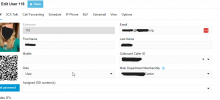
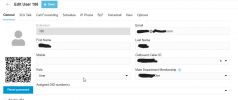
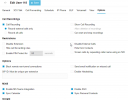
Maybe this isn't super clear. In 3cx I CAN see all the users in the list where i would select to not sync them. So 3cx can see all the users but the users with different domains don't have the office 365 SSO checked in the main screen even though others are. Is there an extra steps in o365 I have to change to allow 3cx to use the other domain names under the same tenant ID? I would assume this is fairly normal procedures with organizations running 3cx that have multiple domain names under one tenant ID (such as from an acquisition of another company) The Black.org email account syncs and has sso. The blank-one.com shows in users but doesnt have the sso box.
 

Attachments

  • 2024-04-08 09_39_35-Admin Console - 3CX.png
    2024-04-08 09_39_35-Admin Console - 3CX.png
    54 KB · Views: 19
  • 2024-04-08 09_39_44-Admin Console - 3CX.png
    2024-04-08 09_39_44-Admin Console - 3CX.png
    33.9 KB · Views: 19
  • 2024-04-08 09_39_19-Admin Console - 3CX.png
    2024-04-08 09_39_19-Admin Console - 3CX.png
    24 KB · Views: 16
  • 2024-04-08 09_04_27-Admin Console - 3CX.png
    2024-04-08 09_04_27-Admin Console - 3CX.png
    24.7 KB · Views: 15
  • 2024-04-08 09_45_29-Greenshot image editor.png
    2024-04-08 09_45_29-Greenshot image editor.png
    5.9 KB · Views: 16
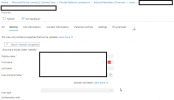
Okay i believe I have found the issue. For some reason the users that are not able to SSO with office 365 in this 3cx instance have the user type greyed out in Entra and I can't change it (i have plenty of o365 permissions so its not that) Any idea on how to be able to change that setting? All the ones that DO work have Member listed here.
 

Attachments

  • Microsoft Entra admin center.png
    Microsoft Entra admin center.png
    22 KB · Views: 18
I was able to fix this by PowerShell changing the user type. Thank the computer lord for hours of google searching.
 
  • Like
Reactions: Charles_3CX
  • Like
Reactions: HIS-Nhenry
Status
Not open for further replies.