My FQDN ssl certificate didn’t auto renew.

Status
Not open for further replies.

drbashaar

Customer
Joined
Oct 14, 2015
Messages
20
Reaction score
1
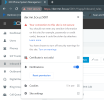
My FQDN ssl certificate didn’t renew. The paid maintenance plan was renewed first of September 2022 like usual. What is the solution?
 
Is this your own fqdn or 3cx one
 
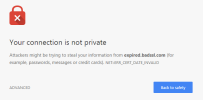
That's not an expired cert warning, those usually look like this:
1667249665776.png

note the error of "cert_date_invalid" and not "ssl_protocol_error"
 

Attachments

  • 9EEDAECA-2FDC-4888-84CB-31C919C5E514.png
    9EEDAECA-2FDC-4888-84CB-31C919C5E514.png
    144.5 KB · Views: 14
  • 8A00B7EA-9C75-45DD-BDD7-7EFBD91FC59A.png
    8A00B7EA-9C75-45DD-BDD7-7EFBD91FC59A.png
    97.1 KB · Views: 14
  • 96AAB05F-9AC7-4B2F-A88E-4AE663B58BE3.png
    96AAB05F-9AC7-4B2F-A88E-4AE663B58BE3.png
    184 KB · Views: 14
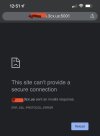
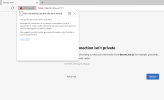
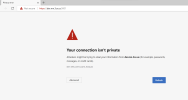
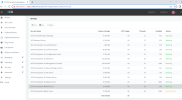
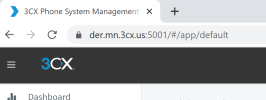
This is how it appears on a browser.
What do you think the solution to this ?
 
That error (from your desktop) is an expired cert error.

What version of 3CX (build number) and where is it running? Do you have ssh/backend access?
 
That error (from your desktop) is an expired cert error.

What version of 3CX (build number) and where is it running? Do you have ssh/backend access?
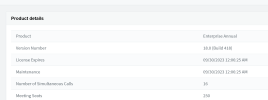
It is version 18.0 (build 418)
It is running locally on a windows server 19
Do you mean an access to the management console?
 

Attachments

  • 4C36290C-FBC0-4A8A-A63C-B30B13CC8E5D.png
    4C36290C-FBC0-4A8A-A63C-B30B13CC8E5D.png
    68.6 KB · Views: 4
Build 418 is old, I think that is 18.0 update 2 or earlier?. I think that is the cause of your issue - you likely need 18.0 update 3 or newer

But... you can try to force the renewal

  • Go to Command Prompt.
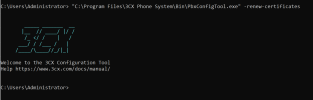
  • Type: “C:\Program Files\3CX Phone System\Bin\PBXWizard\PbxConfigTool.exe” -renew-certificates
  • Press Enter and the result should look something like this:1667274863225.png
  • Restart the nginx service
If that doesn't work, you might need to go in Settings / Parameters and Set or Add TEMPORARY_SELF_SIGNED_CERTIFICATE_GENERATED and give it value of 1.

If that doesn't resolve it then you will need to check the log for the cause.

Sorry I can't be more help
 
Build 418 is old, I think that is 18.0 update 2 or earlier?. I think that is the cause of your issue - you likely need 18.0 update 3 or newer

But... you can try to force the renewal

  • Go to Command Prompt.
  • Type: “C:\Program Files\3CX Phone System\Bin\PBXWizard\PbxConfigTool.exe” -renew-certificates
  • Press Enter and the result should look something like this:View attachment 32612
  • Restart the nginx service
If that doesn't work, you might need to go in Settings / Parameters and Set or Add TEMPORARY_SELF_SIGNED_CERTIFICATE_GENERATED and give it value of 1.

If that doesn't resolve it then you will need to check the log for the cause.

Sorry I can't be more help
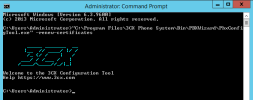
for some reason I didn't have PBXWizar folder, the PBxCofnfigTool.exe resides in Bin
I am just waiting for free time to restart the services
 

Attachments

  • Capture4.PNG
    Capture4.PNG
    28.1 KB · Views: 23
Last edited:
The first error is just a path or spelling issue. Find the 3cx folder and the location of pbxconfigtool and run the command with the correct path.
 
The first error is just a path or spelling issue. Find the 3cx folder and the location of pbxconfigtool and run the command with the correct path.
the nginx server still in "stop pending" and the certificate error still there. I restarted all services at once. I don't know if this is correct or I shouldv'e restarted only the nginx server.
I'll wait and see for now. Please let me know if there is a special reastart for the services instead of restart all.
it is just busy time and the phones are beeing used constantly.
 

Attachments

  • Capture6.PNG
    Capture6.PNG
    330.9 KB · Views: 16
the nginx server still in "stop pending" and the certificate error still there. I restarted all services at once. I don't know if this is correct or I shouldv'e restarted only the nginx server.
I'll wait and see for now. Please let me know if there is a special reastart for the services instead of restart all.
it is just busy time and the phones are beeing used constantly.
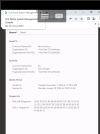
I had to restart the hosting PC then all is good. the certificate now is renewed. but the problem is it is renewed for ONLY 3 months, any suggestions?
 

Attachments

  • Capture7.PNG
    Capture7.PNG
    25.4 KB · Views: 9
  • 08.png
    08.png
    203 KB · Views: 10
Last edited:
That is normal, Let's Encrypt only renews 3 months at a time
 
thank you Sweetaction for your knowledge and help and thanks to everyone here for the solution.
 
Glad you got it resolved!
 
Status
Not open for further replies.

Forum statistics

Threads
111,974
Messages
590,081
Members
164,899
Latest member
mazet