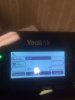
Name listed twice on phone

Status
Not open for further replies.

TCF

Premier Customer
Joined
May 6, 2015
Messages
96
Reaction score
3
I have a Yealink T42G and my name is listed twice on the main screen of my phone for the same extension 102. Does anybody know why this might occur? This is a new setup and I only have 2 extensions / 2 phones on 3CX for testing and each phone has a different name attached to it.

(See Attachment)
 

Attachments

  • IMG_0931.JPG
    IMG_0931.JPG
    68.2 KB · Views: 878
I have found that when auto-provisioning is used, the one extension number against the set will provision to all available line keys. Haven't used the Yealink, but it would make sense that this also happens on these sets. Generally, the configuration file is edited to remove the duplicate extensions, or add others.

http://www.3cx.com/sip-phones/manually-configure-yealink-t32g-t38g-t42g-t46g/

http://www.3cx.com/blog/docs/phone-provisioning-templates/
 
Hey!
I take it from your question this is your first 3CX install? :)
Using the default provisioning template that is how it displays "Lines".
So those are your phones 2 outgoing lines.
We change them from name to extension since no ones name is that short so it is always cutoff.
In the template it is account.1.label = %%extension_first_name%% %%extension_last_name%%
We change it to account.1.label = %%extension_number%%

If youd like PM me and i will send you a copy of my templates. There are a few dozen modifications in the template.
 
Thanks both of you! Yes this is my first install, we just got the phones and software a few days again, just learning the ropes.
 
I only want my phone to have 1 line. I have figured out how to change this inside the phone's web GUI, but cannot find a way to do it in the template file. Could someone please provide the code line I need to remove or edit to only give 1 line by default and not 2. Thanks.
 
settings section - look for the phone templates for your phone model.
remove everything associated with account.2, account.3, etc.
be careful and do not remove too much or the phone may not work. just the account settings for the extra accounts.
then in 3cx under the extension, if you do not want more than 1 call to come in, uncheck that action under the forwarding rules. (this may be the default)

just out of curiosity, is this a call center? most people want to see another incoming call, and possibly ask the person they are speaking with to hold briefly if the 2nd call is one they are waiting for (or perhaps the kids school/nanny/etc calling with an emergency).
 
We do have a call center with 6 of our phones but the rest of our phones would only have 1 line. Good point, I now see the purpose of the 2 lines being listed. Thank You.
 
Status
Not open for further replies.

Members Online Now

Forum statistics

Threads
111,835
Messages
589,291
Members
164,668
Latest member
Infinity Network