Network interfaces confusion

Status
Not open for further replies.

vocale

Free User
Joined
Mar 31, 2008
Messages
18
Reaction score
2
Hi there,

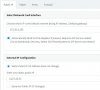
Trying to access via Web app and it just doesn't;t connect to the 172 address (Default Internet Facing IP address) in the attached image... it DOES connect to the other 'External IP Config address 33 etc...

Any clues as I think this may be why IOS provisioning isn't working as well.

3CX.jpg

Cheers, Graham
 
Is the 3CX system hosted or local.

If local

1. Is this Debian or Windows installation.

2. Does the server have one network card, and it has the correct gateway settings

3 Can you ping 172.30.3.153

4. Can you access the Management console via ip address ?. http://<ip address>:443 or http:<ip address>:5000

5. Have you played around with Security - Console Restrictions ?
 
Is the 3CX system hosted or local.

If local

1. Is this Debian or Windows installation.

2. Does the server have one network card, and it has the correct gateway settings

3 Can you ping 172.30.3.153

4. Can you access the Management console via ip address ?. http://<ip address>:443 or http:<ip address>:5000

5. Have you played around with Security - Console Restrictions ?


Hi there and BIG thanks for message...

1: Hosted in AWS

2: All IP addresses in the image were configured automatically

3: No

4: I can if I use the 33 address

5: Yes, not much use there.

6: I did mange to use Firefox to get to the Console using https://3.227.22.53 - but Firefox proclaimed it's an insecure site

Very odd.....
 
Hi there and BIG thanks for message...

3. No

6: I did mange to use Firefox to get to the Console using https://3.227.22.53 - but Firefox proclaimed it's an insecure site

3. This is correct as the system is hosted in the cloud and you are not on the same network

6. This is normal, as the system is protected by an SSL certificate if you selected 3cx fqdn at installation time.

Can you ping the 3cx fqdn and does it resolve to the correct wan IP address.

Can you access the management console via https://fqdn
 
Last edited:
When you say IOS is not working, how did you setup the device.

Did you send the welcome email to the users, and this has all the required steps to install the software, import the settings via the config file or scanning the QR code.

Under Extensions - Select an extension and under Options have you unticked 'Block Remote Tunnel Connections (3CX App connections with Tunnel enabled & SBC will be blocked)' This is required for remote mobile applications and 3CX app to connect remotely.

Check the 3CX blacklist and remove any entries.
 
Bizarrely - after doing nothing for a while - the QR code worked! Sorry to have wasted your time but thanks anyway :)
 
You have not wasted my time, main thing it is now working.
 
Status
Not open for further replies.

Latest Posts

Forum statistics

Threads
111,945
Messages
589,874
Members
164,837
Latest member
Support99