- Joined
- Apr 29, 2020
- Messages
- 3
- Reaction score
- 0
Hi
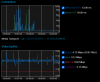
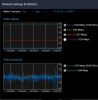
Where can I get a better understanding of how the Webmeeting stats page is outlining the bandwidth I have to upload video. At the moment I constantly get 'severely degraded ability in sending video to others' which makes no sense I constantly have a very good connection at home (over 200+ download and 30+ upload). Tested with other services like Zoom and Microsoft teams and video/audio no issues.
At the moment I'm testing against London 0108 servers but while my downlink capacity does not seem to be affected the uplink capacity is limited. It mentions limited to 0.93Mbps but not sure how the system is deriving this number. Have used multiple machines at home using Microsoft Edge and Chrome. Have tried to review on Ipad with 3CX WebMeeting but that does not seem to have the same network settings & statistics that I can at least fine.
Also noticed some very high websocket RTT that can jump up to 1000ms+ at times. Not sure what the norm is around this number.
3CX server is in Azure and I'm only person using.
I've removed my home firewall from the path (Sophos XG) and I'm just plugged into a Asus Rt-AC5300 onto BT infinity ultrafast.
Maybe just how I'm looking at this but looking to check any additional diagnostics I can review beyond what is available online which I've run through
Thanks
julian
Where can I get a better understanding of how the Webmeeting stats page is outlining the bandwidth I have to upload video. At the moment I constantly get 'severely degraded ability in sending video to others' which makes no sense I constantly have a very good connection at home (over 200+ download and 30+ upload). Tested with other services like Zoom and Microsoft teams and video/audio no issues.
At the moment I'm testing against London 0108 servers but while my downlink capacity does not seem to be affected the uplink capacity is limited. It mentions limited to 0.93Mbps but not sure how the system is deriving this number. Have used multiple machines at home using Microsoft Edge and Chrome. Have tried to review on Ipad with 3CX WebMeeting but that does not seem to have the same network settings & statistics that I can at least fine.
Also noticed some very high websocket RTT that can jump up to 1000ms+ at times. Not sure what the norm is around this number.
3CX server is in Azure and I'm only person using.
I've removed my home firewall from the path (Sophos XG) and I'm just plugged into a Asus Rt-AC5300 onto BT infinity ultrafast.
Maybe just how I'm looking at this but looking to check any additional diagnostics I can review beyond what is available online which I've run through
Thanks
julian