Solved New Install - No audio

Status
Not open for further replies.

DrainBamaged

Forum User
Advanced Certified
Joined
Feb 21, 2019
Messages
168
Reaction score
41
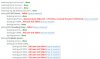
Am putting in a new 3CX server on SIP. Calls are connecting, but no audio. Wireshark on a call shows no errors. Ran a firewall test and see this:

What causes the "full cone test" message?

10861
 
If you press on the "How to resolve?" link, you will get more information on why it is failing. Full cone test, if you check the linked site is Test 2.

Long story short, Firewall Rules.
 
It's a direct SIP connection on an independent NIC. Does not go through a firewall.
 
So you have 2 NICs on your 3CX server? Could you explain a bit more how your network is setup?
 
Yes two NICs. One goes to internal network / Internet. NIC 2 is a direct link to the SIP.

When I run the firewall test which connection does it test?
 
Check the network configurations here: https://www.3cx.com/blog/docs/network-configurations-supported-3cx-phone-system/
I think you fall under the the category "Multiple internet gateways"

When you run the FW Checker, it goes out through the NIC that has a default GW.

What you need to do in your case is create static routes for the SIP and Media IPs of your Provider and force the traffic from 3CX to go out the correct NIC. This should ensure that traffic from 3CX is routed outbound correctly.
Also, in the SIP Trunk settings, in the Options tab, you would need to set the LAN IP of the NIC you have for you Provider in the field "Select which IP to use in 'Contact' (SIP) and 'Connection'(SDP) fields", just select "Use this IP" in the drop-down to enter it.
Last, you must make sure that the NIC you have for your Provider does not have a default GW configured.

There is a guide we have for a supported provider that has a similar setup, you can check it out to see if it helps at all: https://www.3cx.com/docs/asia-sip-trunk-singtel/
 
Hi NickD,

I can confirm we have done all of those steps.
  • I have a static route on the Windows server to push traffic to their DNS and SIP servers down the SIP NIC.
  • We set the "Select which IP to use in 'Contact' (SIP) and 'Connection'(SDP) fields" this morning
  • There is no GW defined on the SIP NIC.
Reviewing your document now. Thanks.
 
As far as I can see, we are set up just like the Asia example in your doc. No DNS servers, no GW and static route in place for the subnet.

The new site is in another county. I am connecting via a softphone on my test PC beside me and connecting via a FQDN:5001 config on the public IP. The phone registers correctly and places calls, but no audio.
 
Just to rule out the problem being somewhere else:
  • Do calls between extensions work and have audio?
  • If you call from your extension to *777 and speak into the mic, do you hear your voice? (this is a echo test number)
  • In the SIP Trunk settings, do you have "PBX Delivers Audio" checked? (It is also usually best to have "Supports Re-Invite" and "Support Replaces" disabled)
  • You said you captured traffic in Wireshark. Do you see RTP going from the 3CX server out through the Provider NIC to the Provider GW and vice versa?
 
Sorry for the delay. Been a really busy time faultfinding this (and a half dozen other things that fell over.)
We've fixed the no audio issue. Was DNS related.
 
  • Like
Reactions: NickD_3CX
Status
Not open for further replies.

Forum statistics

Threads
111,926
Messages
589,762
Members
164,799
Latest member
RicoDinero