New M900 Setup with SBC

Status
Not open for further replies.

TWCC Luke

Premier Customer
Joined
Aug 4, 2021
Messages
10
Reaction score
0
Hello,

I have a new Snom M900 I am trying to configure. 3CX is running in the cloud and we an SBC running local that is connected with no issues. I am trying to get my new M900 to provision but not having any luck. I think the issue is that my firmware is old. I am running IPDECT-V2/04.50/B0013/12-Nov-2019. What version and branch should I use to run my update so I can get it up to date and then provisioned? I have tried a handful from snom's website but they never update. Thanks!
 
Hello,

I have a new Snom M900 I am trying to configure. 3CX is running in the cloud and we an SBC running local that is connected with no issues. I am trying to get my new M900 to provision but not having any luck. I think the issue is that my firmware is old. I am running IPDECT-V2/04.50/B0013/12-Nov-2019. What version and branch should I use to run my update so I can get it up to date and then provisioned? I have tried a handful from snom's website but they never update. Thanks!
Hi Luke,

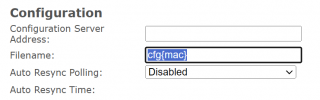
Make sure you remove the text from this 2nd field.

Then just paste our config link in the 1st field and click Save and Reboot.

1724672492911.png

- If in doubt, paste the link in your browser first from the same location as the M900 to ensure the file can be downloaded.

- You can upgrade the firmware using Snom's instructions to reach the latest
 
  • Like
Reactions: bitn2
I think my problem is the firmware… I can’t seem to find the correct version and branch numbers. Everything I put it fails or doesn’t actually update anything. What is the current version I should be putting in?
 
I think my problem is the firmware… I can’t seem to find the correct version and branch numbers. Everything I put it fails or doesn’t actually update anything. What is the current version I should be putting in?
Did you followed the link i posted above? There you will find everything you need.
 
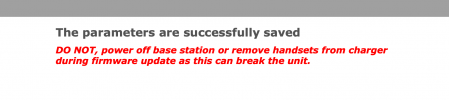
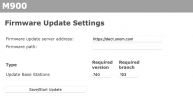
I did, and I plug in 740 and 103 and the base station restarts but isn't updated. See my screenshots below.
 

Attachments

  • Screenshot 2024-08-26 at 8.25.14 AM.png
    Screenshot 2024-08-26 at 8.25.14 AM.png
    46 KB · Views: 7
  • Screenshot 2024-08-26 at 8.25.08 AM.png
    Screenshot 2024-08-26 at 8.25.08 AM.png
    57.9 KB · Views: 7
  • Screenshot 2024-08-26 at 8.20.37 AM.png
    Screenshot 2024-08-26 at 8.20.37 AM.png
    109.7 KB · Views: 7
On which firmware ist the base at the moment? What does the log says on the base station?
 
Current firmware is IPDECT-V2/04.50/B0013/12-Nov-2019 14:03

I don't see anything pertinent in the logs but I've attached them here.
 

Attachments

You need to upgrade in steps.. First to 5x than to 530 and than it could be possible to go to 740
 
Ok, that was the issue. I was trying to jump to the latest. Walking my way through the firmware updates now. Thanks!
 
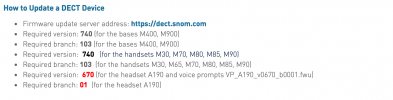
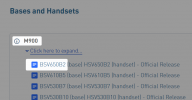
Use this version which is an Official Release.

The one you were trying does not say official, so maybe stay on this for now:


1724740465848.png

Also never update this type of device before reading their release notes - there are important changes and requirements that you need to be aware of before you proceed.
 
  • Like
Reactions: bitn2
Status
Not open for further replies.

Members Online Now

Forum statistics

Threads
111,832
Messages
589,278
Members
164,662
Latest member
DejanMDS