- Joined
- Mar 12, 2020
- Messages
- 143
- Reaction score
- 14
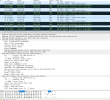
Hello all, I have some phones that all of a sudden decided to stop transmitting audio. If I dial an internal extension from a yealink 42s to another, it rings and they pick up, but no sound. Also have yealink 48s that are doing the same thing. When I look at the logs from the phone and from wireshark, the communicating is going back and forth, but the phone is refusing the ports sent by the 3cx server. Thank you.
I read a post similar and the user said they solved by themselves, it was a backend 3cx setting, but didn't provide the solution.
6.0.7.1078
windows server 2019
Log from phone
<131>Jan 21 12:13:24 GUI [564:564]: APP <3+error > 804.501.943:from[app_vpPhone] sync[0] msg[394981][0][0] size[0] target[0xc801d1d4] not found
<131>Jan 21 12:13:24 GUI [564:564]: APP <3+error > 804.508.448:from[app_vpPhone] sync[0] msg[394981][0][0] size[0] target[0xc801d1d4] not found
<131>Jan 21 12:13:29 GUI [564:564]: APP <3+error > 809.501.901:from[app_vpPhone] sync[0] msg[394981][0][0] size[0] target[0xc801d1d4] not found
<131>Jan 21 12:13:29 GUI [564:564]: APP <3+error > 809.502.602:from[app_vpPhone] sync[0] msg[394981][0][0] size[0] target[0xc801d1d4] not found
wireshark
I read a post similar and the user said they solved by themselves, it was a backend 3cx setting, but didn't provide the solution.
6.0.7.1078
windows server 2019
Log from phone
<131>Jan 21 12:13:24 GUI [564:564]: APP <3+error > 804.501.943:from[app_vpPhone] sync[0] msg[394981][0][0] size[0] target[0xc801d1d4] not found
<131>Jan 21 12:13:24 GUI [564:564]: APP <3+error > 804.508.448:from[app_vpPhone] sync[0] msg[394981][0][0] size[0] target[0xc801d1d4] not found
<131>Jan 21 12:13:29 GUI [564:564]: APP <3+error > 809.501.901:from[app_vpPhone] sync[0] msg[394981][0][0] size[0] target[0xc801d1d4] not found
<131>Jan 21 12:13:29 GUI [564:564]: APP <3+error > 809.502.602:from[app_vpPhone] sync[0] msg[394981][0][0] size[0] target[0xc801d1d4] not found
wireshark