No audio from Reception (inside)

donamos

Customer
Joined
Jan 22, 2025
Messages
2
Reaction score
0
Hi guys,

I just purchased 3CX v20. I have configured 4 sip trunks, 2 from Vodafone and 2 from other OTHER VoIP provider, 2 trunks from Vodafone are working perfectly i can make calls from outside -inside and vice versa and everything is OK.
But on other 2 trunks from other Voip Providers i have an issue with audio. Example:
The client is calling from outside to inside (inside is routed to the Reception extension), the Reception voip yealink t44u phone is ringing , the receptionist open it, the client can hear the voice of receptionist but the receptionist can NOT hear the client.

What should be the issue ?

BR
Amos
 
One way audio, as first step you should run the firewall checker in the pbx in order to know if the port forwarding is configured correctly, and also to know if you are in presence of any sip alg or not. From dashboard ---- click on firewall and run the test during out of office hours or when the system is not being used.

If the firewall checker passes successfully, I suggest you to enter in contact directly with the voip provider used since the issue is only when using the generic trunks.

Have a good day!
 
Thanks for your answer Alejandro.

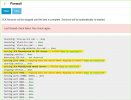
On my firewall check i have the following errors as in picture attached, and i am not sure how to fix them I have read the instruction *How to resolve* but still no success to fix them. Is any other solutions to fix them?

Thanks
 

Attachments

  • 3CX.jpg
    3CX.jpg
    85.2 KB · Views: 7
The error is because the ports are being remapped (changed when they are leaving the network), please check that you are not using any source port remapping in the firewall, or if you are not using a corporate internet connection, your ISP could be remapping the ports on their end, so you will need to check this with them too.

Review this doc for further details.

Port Preservation​

Port preservation is another key factor which is checked by the firewall checker. It detects if the firewall alters the port during the LAN IP to WAN IP translation. Technically speaking this should not matter, however it depends on the provider's implementation whether they reply to the transport source port of 3CX seen in the UDP header rather than what is defined by the RFC. The RFC defines that a SIP server MUST reply to the defined “contact” IP and Port which is in the content of the SIP message. In order to eliminate any “maybies” the firewall checker also validates this mapping. It is required that if a SIP message is generated locally by 3CX from the source port 5060 (default SIP Port) then translated to the public IP Address (WAN IP) the port, in this case 5060 remains unchanged.

To do this the firewall checker will run two independent tests with the first configured STUN Server in your system. By default this is set to stun.3cx.com. It is highly recommended that this is not altered. Overall, the firewall checker is a programmatic way to detect your public IP address, similar to using a website like “what is my IP”, but is extended to also check the port.
 

Latest Posts

Members Online Now

Forum statistics

Threads
111,831
Messages
589,276
Members
164,660
Latest member
RJenkinsROCK