Not able to reach the external 3CX FQDN, nor its external IP address with a new 3CX debian 20 installation on Geekom. Please help?

mg-aqis

SOHO User
Joined
Jul 2, 2025
Messages
3
Reaction score
1
Hi,
We used to have a 3CX Pi installation and had to move now to a debian install, to which I'm very new to it.

The current situation :
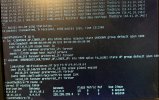
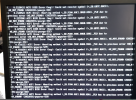
1. starting Debian, some errors occur (see screenshot), but it seems to boot up correctly. From what I found the error could be related to "
This often happens when the hardware or BIOS is too new for the currently running operating system or kernel." Is this a problem?

2. I can reach 3CX, config, add phones etc., but only by using it's local LAN IP. Our installation is using a Telenet Modem (which should be fully open) with a dynamic IP address, followed by my own router, NAT configured to serve the different ports directing to the local LAN IP.

What am I overlooking or missing?
Please advise? Thank you.
Kind Regards,
Mieke

Screenshot 2025-07-19 at 21.43.37.png
 
You used the 3cx iso yes?
Also you need the FQDN to be routed internally too. So if you ping domain.3cx.com internally you should get a local ip not external.
Does the firewall pass?
 
Hi,

As mentioned above, firstly does the firewall show Green? Secondly, you mention having a dynamic IP address. Do you have a system updating the DNS whenever that IP changes?

Is the 3CX IP set to dynamic in the config panel?

As you cannot reach even via IP this does seem like a firewall issue, or something wrong with the networking setup on the PBX.

If you run as root the following two commands:
ip a
route -n
What do they show (anonymise any private bits)?
 
You used the 3cx iso yes?
Also you need the FQDN to be routed internally too. So if you ping domain.3cx.com internally you should get a local ip not external.
Does the firewall pass?
Hello,
Thank you for your valuable questions, which helped me one step further. Here is my response

1. Yes, I've used the 3CX debian ISO to install the software.
2. Ping our 3CX domain within our LAN
PING xxxxx.3cx.be (94.xxx.xxx.xxx): 56 data bytes
92 bytes from 10.41.10.146: Redirect Host(New addr: 10.41.10.1)
Vr HL TOS Len ID Flg off TTL Pro cks Src Dst
4 5 00 0054 f69c 0 0000 3e 01 97df 10.41.10.182 94.xxx.xxx.xxx

3. Ping from the WAN it returns a timeout, not able to launch the 3CX site through https://mysite.3cx.be

4. Firewall check does not pass - it gives errors.
  • resolving 'stun-eu.3cx.com'... done
  • resolving 'stun2.3cx.com'... done
  • resolving 'stun3.3cx.com'... done
  • resolving 'sip-alg-detector.3cx.com'... done
  • testing 3CX PhoneSystem 01 SIP Server... failed (How to resolve?)
    • stopping service... done
    • detecting SIP ALG... not detected
    • testing port 5060... full cone test failed (How to resolve?)
    • starting service... done
  • testing 3CX PhoneSystem Media Server... canceled
5. No Dynamic DNS configured
6. ports on the router have all been openen for TCP & UDP
6. output from the activity log - looks like there is another STUN server that resolves to the same IP address.
Message
21/07/2025 18:46:06.991 [CM506004]: STUN request to STUN server 192.248.177.74:3478 has timed out; used Transport: 0.0.0.0:5060/UDP fk=0 tgt=
21/07/2025 18:46:03.935 [CM506004]: STUN request to STUN server 192.248.177.74:3478 has timed out; used Transport: 0.0.0.0:5060/UDP fk=0 tgt=
21/07/2025 18:46:00.927 [CM506004]: STUN request to STUN server 192.248.177.74:3478 has timed out; used Transport: 0.0.0.0:5060/UDP fk=0 tgt=
21/07/2025 18:45:57.920 [CM506004]: STUN request to STUN server 192.248.177.74:3478 has timed out; used Transport: 0.0.0.0:5060/UDP fk=0 tgt=
21/07/2025 18:45:54.812 There's another STUN server that resolves to the same IP: 147.135.193.83:3478/UNKNOWN_TRANSPORT fk=0 tgt=; ignored
21/07/2025 18:25:54.808 [CM306002]: There is no valid STUN server specified! External IP can not be resolved.
21/07/2025 18:06:06.883 [CM506004]: STUN request to STUN server 192.248.177.74:3478 has timed out; used Transport: 0.0.0.0:5060/UDP fk=0 tgt=
21/07/2025 18:06:03.875 [CM506004]: STUN request to STUN server 192.248.177.74:3478 has timed out; used Transport: 0.0.0.0:5060/UDP fk=0 tgt=
21/07/2025 18:06:00.868 [CM506004]: STUN request to STUN server 192.248.177.74:3478 has timed out; used Transport: 0.0.0.0:5060/UDP fk=0 tgt=
21/07/2025 18:05:57.861 [CM506004]: STUN request to STUN server 192.248.177.74:3478 has timed out; used Transport: 0.0.0.0:5060/UDP fk=0 tgt=
21/07/2025 18:05:54.716 There's another STUN server that resolves to the same IP: 147.135.193.83:3478/UNKNOWN_TRANSPORT fk=0 tgt=; ignored

I hope this gives you some more input into the current situation.
Looking forward seeing your feedback.
Thank you for your help.
Mieke
 
  • Like
Reactions: KyriacosS_3CX
  • Like
Reactions: KyriacosS_3CX
Hi,

As mentioned above, firstly does the firewall show Green? Secondly, you mention having a dynamic IP address. Do you have a system updating the DNS whenever that IP changes?

Is the 3CX IP set to dynamic in the config panel?

As you cannot reach even via IP this does seem like a firewall issue, or something wrong with the networking setup on the PBX.

If you run as root the following two commands:
ip a
route -n
What do they show (anonymise any private bits)?
Hi,
Thank you for your questions.

Hereby the requested information.

* Set to dynamic, and no DDNS installed.
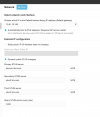
* And yes, maybe something wrong with the network setup on the PBX. - see screenshots
Maybe the value of
Choose which IP is the Default Internet facing IP address (Default gateway)
is set to 10.41.10.146, but this is the 3CX server behind the firewall. At the moment I can't change that IP. Is this still possible?

Looking forward seeing your input and feedback.
Many thanks in advance.
Mieke
 

Attachments

  • 3CX.jpg
    3CX.jpg
    1.7 MB · Views: 4
  • Screenshot 2025-07-21 at 21.47.57.png
    Screenshot 2025-07-21 at 21.47.57.png
    155.7 KB · Views: 4
The IP selection there is for the interface with the default gateway on it so .146 seems correct.

You should be able to browse to https://10.41.10.146 (or https://10.41.10.146:5001?) from a PC on the LAN, though there will be a certificate name mismatch of course.
 
  • Like
Reactions: KyriacosS_3CX
Hi,

From all the above info, it does seem you have some mistake in your firewall config with regards to NAT/Port forwarding. You might want to reach out to the vendor/community of that device for some assistance. Setup on the 3CX server looks OK.

Best,
KS.
 

Forum statistics

Threads
111,958
Messages
589,938
Members
164,861
Latest member
LewisJC