


- Joined
- Jul 27, 2023
- Messages
- 7
- Reaction score
- 1
UNSUPPORTED
Obihai is going to discontinue their support for this device in the near future so there are a lot of these ATA's floating around...
I'm using it to connect to some traditional cordless phones at a remote location where I already have a Yealink T53W setup as a router phone.
I use Grandstream HT802's for more permanent setups but this is a very fast and cheap solution if you have one laying around. This solution can also be WIFI connected using the additinal USB plugin.
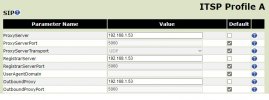
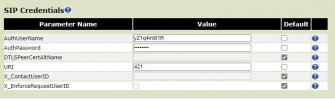
Do a factory reset of Obi200 device and go with the defaults for everyting. Connect through the ATA's web interface (determine IP by pressing *** on an analog phone connected to the Obi200) and then set these entries. The IP address in the pictures should be the IP address of your current router phone or SBC. URI is the extension number.
There is an Obi brand WIFI USB adapter for the Obi which I am using and works without issue. It has its own quick and easy setup process.
The second screenshot is for the SP1 section settings on the Obi200.
The user and password entries are from the 3CX user welcome email or they can be found in the 3CX management console.
There are of cource a million other settings on this ATA but this should meet your initial needs.
Obihai is going to discontinue their support for this device in the near future so there are a lot of these ATA's floating around...
I'm using it to connect to some traditional cordless phones at a remote location where I already have a Yealink T53W setup as a router phone.
I use Grandstream HT802's for more permanent setups but this is a very fast and cheap solution if you have one laying around. This solution can also be WIFI connected using the additinal USB plugin.
Do a factory reset of Obi200 device and go with the defaults for everyting. Connect through the ATA's web interface (determine IP by pressing *** on an analog phone connected to the Obi200) and then set these entries. The IP address in the pictures should be the IP address of your current router phone or SBC. URI is the extension number.
There is an Obi brand WIFI USB adapter for the Obi which I am using and works without issue. It has its own quick and easy setup process.
The second screenshot is for the SP1 section settings on the Obi200.
The user and password entries are from the 3CX user welcome email or they can be found in the 3CX management console.
There are of cource a million other settings on this ATA but this should meet your initial needs.
Last edited:


