Obi202 No Outbound calls

Status
Not open for further replies.

hol9798

Free User
Joined
Apr 24, 2020
Messages
18
Reaction score
3
Hello! I am trying to configure an Obi202 with three GV accounts to work with 3CX. Inbound calling for all three work, and are set-up as DIDs. For the time being, I have the trunk set to 3 simultaneous calls and have verified that works inbound as well. My trouble is outbound calling.
When dialing out, I get dead air followed by an intercept. I've followed several of the other posts, but still cannot figured out why it is not working. In the Obi Dashboard, SP4 shows as "Registered".

EDIT: Here are the logs when I place a call (Using a Toll-free for public posting; local/long lines has the same result):
04/29/2020 6:55:01 PM - Call to T:Line:10002>>18004377950@[Dev:sip:[email protected]:5083] from L:27.1[Extn:184] failed, cause: Cause: 404 Not Found/INVITE from 10.172.17.207:5083
04/29/2020 6:55:01 PM - [CM503003]: Call(C:27): Call to <sip:[email protected]:5083> has failed; Cause: 404 Not Found/INVITE from 10.172.17.207:5083

Any thoughts or guidance is greatly appreciated!!

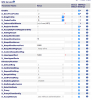
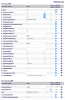
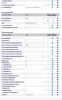
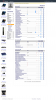
I've attached screenshots of my config:
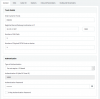
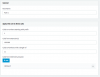
Screen Shot 2020-04-29 at 6.47.23 PM.pngScreen Shot 2020-04-29 at 6.47.23 PM.pngScreen Shot 2020-04-29 at 6.48.10 PM.pngScreen Shot 2020-04-29 at 6.48.47 PM.png
 
There are not many on the Forum that have dealt with GV and the Obi as it is not offered as a commercial service, and only in the US.

I have only set up the Obi200 (previously a Obi110), with a single instance of GV. The X-InboundCallRoute I use is {10000>(xx.):SP}, where 10000 is the 3CX trunk group, and SP is the default GV route.
Does the Obi call log show a record? I did have an issue until I made some changes to the 3 settings directly above that. It wasn't happy that they had been left in the default (same choice as the other SP service)
 
Last edited:
3CX trunk is 10002, so i entered {10002>(xx.):SP} (also tried with "SP1" to force using the first GV account).
X_ServProvProfile = D
X_RingProfile = A

X_CodecProfile = A

It looks like (by default) CodecProfile A & B are the same (can be found under "Codecs" on the right). RingProfile is the tone heard when calling someone- -based on country. Since I have this set-up on SP4, my understanding is ServProvProfile should be "D". What do you have for those three and can you tell me what your codec profile contains?

Still no luck in outbound calls - dead air then intercept tones (SIT). The Obi does not show anything in the call logs. Again, Incoming works perfectly.

Thanks for your help!
 
Can you post the remaining part, of the SP4 page, you posted earlier.
 
Here is all of SP4
 

Attachments

  • Screen Shot 2020-05-01 at 12.53.20 PM.png
    Screen Shot 2020-05-01 at 12.53.20 PM.png
    104 KB · Views: 27
  • Screen Shot 2020-05-01 at 12.49.46 PM.png
    Screen Shot 2020-05-01 at 12.49.46 PM.png
    107.5 KB · Views: 27
I am able to now place calls externally via GV. It took a bit, but I think this is what did it:
First I enabled call debugging for SP1 and SP4. Wow...alot of data. This one stuck out:
SIP/2.0 404 Not Found Call-ID: 6rqqX4GiWS-XcRw5y_Sezw

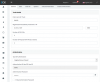
In peeking around, it looks like the obi will match the SP4/CallerIDName with information sent from 3CX Caller ID. Neither of those fields were configured previously. I undid the X_RegisterEnable and X_Proxy changes I made from instructions on configuring Obi202 with FreePBX (from Obi Forum) because prior to the changes both systems were showing as "registered", now neither one of them are.Screenshot_2020-05-01 OBiTALK OBi202.png

So I changed the following configs:

Obi202:
SP4/CallerIDName = 10001 (Trunk number)
SP4/X_RegisterEnable = yes (checked)
SP4/X_Proxy = no (unchecked)

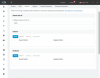
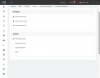
3CX
SIPTrunks/10002/General/Authentication/Type of Authentication = Register/Account Based
SIPTrunks/10002/CallerID/Default Caller ID/Configure Outbound Caller ID=10002
SIPTrunks/10002/Options/Advanced/Supports Re-invites=No (Unchecked)

I've attached screen shots in case anyone else has similar issues and would love to hear any thoughts (especially if you see anything in my configs that looks "off").
 

Attachments

  • Screenshot_2020-05-01 3CX Phone System Management Console.png
    Screenshot_2020-05-01 3CX Phone System Management Console.png
    47 KB · Views: 32
  • Screenshot_2020-05-01 3CX Phone System Management Console(1).png
    Screenshot_2020-05-01 3CX Phone System Management Console(1).png
    51.5 KB · Views: 33
  • Screenshot_2020-05-01 3CX Phone System Management Console(2).png
    Screenshot_2020-05-01 3CX Phone System Management Console(2).png
    38.7 KB · Views: 33
Status
Not open for further replies.

Latest Posts

Forum statistics

Threads
111,945
Messages
589,869
Members
164,836
Latest member
saranga