Office 365 Integration Issue

Status
Not open for further replies.

jweldon

SOHO User
Joined
Jul 26, 2021
Messages
27
Reaction score
1
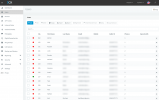
We are trying to get our O365 environment to integrate with our 3cx. I have followed the steps, but when i go to user sync and check the box everything else is still greyed out.

When i check the logs it should the O365 attempt but has zeros for all the categories
 
We are trying to get our O365 environment to integrate with our 3cx. I have followed the steps, but when i go to user sync and check the box everything else is still greyed out.

When i check the logs it should the O365 attempt but has zeros for all the categories
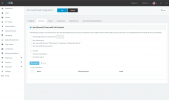
Maybe you have the "All Users" selected on the radio box?

Can you send a full screen screenshot of what you see?
 

Attachments

  • snapshot.PNG
    snapshot.PNG
    47.4 KB · Views: 10
  • snapshot1.png
    snapshot1.png
    143.9 KB · Views: 8
There you go.
 
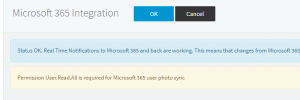
You got something not done on the configure tab. You should have a banner at the top like this:
1648769469118.png

When the integration is configured correctly.

Also 365 integration is available in pro and up - your forum profile says free user, but sometimes it's just not linked.
 
  • Like
Reactions: NickD_3CX
You got something not done on the configure tab. You should have a banner at the top like this:
View attachment 29184

When the integration is configured correctly.

Also 365 integration is available in pro and up - your forum profile says free user, but sometimes it's just not linked.
I understand that. However, I have followed all the steps. I haven't seen that banner. Could there be something in the O365 config that isn't listed in the instructions?
 
As far as I know, only the 3 steps as listed are needed.

Try hitting this button again:
1648834094598.png
 
As far as I know, only the 3 steps as listed are needed.

Try hitting this button again:
View attachment 29196
I have done this multiple times. I see a loading bar for a second or so and then it goes back to the O365 page with no banner. Are there any logs I can look at that would tell me what the issue maybe?
 
I have done this multiple times. I see a loading bar for a second or so and then it goes back to the O365 page with no banner. Are there any logs I can look at that would tell me what the issue maybe?
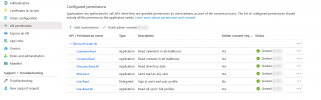
One other thing I noticed is in API Permissions the Directory.Read.All and User.Read.all are set to Admin Consent requested "Yes". Should that be no?
 
One other thing I noticed is in API Permissions the Directory.Read.All and User.Read.all are set to Admin Consent requested "Yes". Should that be no?
Yes, generally the API Persmissions should look like this:
1648884530454.png
 
As far as I know, only the 3 steps as listed are needed.

Try hitting this button again:
View attachment 29196
I even just deleted and recreated the integration all over and it still doesn't give me the banner.
Yes, generally the API Persmissions should look like this:
View attachment 29199
So all of mine say granted but the only two that show "Yes" in Admin consent requested is directory.read.all and user.read.all. Should all the other be set to "Yes"?
 
I am pretty sure you aren't logging into the Management Console using the global admin account.
How are you logging in, are you using "admin" as the Username, or are you logging in using the credentials of a User that has admin rights?

Try logging in using the global admin credentials.
 
Status
Not open for further replies.