Solved Office 365 Re-Provisioning Error - 3CX v18.0.9.20

Status
Not open for further replies.

PHK123

Forum User
Joined
Dec 18, 2023
Messages
5
Reaction score
1
Hello 3CX Community,

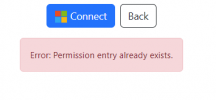
I'm experiencing a challenge while trying to re-provision the Office 365 integration on my 3CX system (version 18.0.9.20). After successfully logging in with my Microsoft account, I encounter the following error message: "Error: Permission entry already exists." 3CX v18.0.9.20.

Here's what I've done:
  1. Attempted to re-provision the Office 365 integration in the 3CX portal.
  2. Successfully logged in with Microsoft account credentials.
  3. Received the error message immediately after login.
It's noteworthy that this issue is specific to my 3CX installation. I manage other 3CX systems for different clients, and they do not exhibit this error when integrating with Office 365.

I'm seeking insights or solutions from anyone who might have faced a similar issue or knows how to overcome this specific error in the re-provisioning process.

Any advice or shared experiences would be greatly appreciated. Thank you in advance for your assistance and time!

Best regards,
Paul
 

Attachments

  • Screenshot 2023-12-19 094557.png
    Screenshot 2023-12-19 094557.png
    5 KB · Views: 7
I take it you’re not using SMB but access the azure portal and delete the app registration that is already created for the integration from the app registration settings in order to reconfigure the integration again.
 
I take it you’re not using SMB but access the azure portal and delete the app registration that is already created for the integration from the app registration settings in order to reconfigure the integration again.
Hello Charles_3CX,

Thank you for your suggestion. I understand the approach of deleting the app registration in Azure. However, I've successfully re-provisioned Office 365 integration on other client's 3CX systems without needing to delete the app registration. This makes me wonder why this specific case requires a different approach.

Is there a possibility that unique settings in my current 3CX setup are causing this issue? Or are there alternative steps I could consider before proceeding with the deletion in Azure?

Appreciate your insights.
 
Hello everyone,

Quick update: I've discovered the root of the issue. It turns out that the permission settings in Azure were not configured correctly for this particular client. After adjusting these settings, the re-provisioning of the Office 365 integration in 3CX worked as expected.

I hope this information helps anyone else facing a similar issue. Thank you all for your suggestions and support!
 
  • Like
Reactions: NicholasP_3CX
Hello everyone,

Quick update: I've discovered the root of the issue. It turns out that the permission settings in Azure were not configured correctly for this particular client. After adjusting these settings, the re-provisioning of the Office 365 integration in 3CX worked as expected.

I hope this information helps anyone else facing a similar issue. Thank you all for your suggestions and support!
I am glad that you found the issue. incorrect graph permissions are usually the cause of the error you saw, That is why it was suggested to delete the app registration and re-integrate, which is now all taken care of automatically from our side and avoids these issues in the future.
 
Status
Not open for further replies.