


- Joined
- Dec 28, 2021
- Messages
- 2
- Reaction score
- 1
I migrated from FusionPBX to 3CX and I'm a bit confused on how I only have a few ways to do things. In my experience with FusionPBX, I could do a lot of different options.
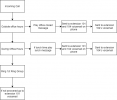
For starters, I currently have a client who wants to be able to answer the phone normally during their open hours. Simple enough. They also want to have different messages for their lunch time and out of office hours with the option with leaving a voicemail. Here's a wrench. They would like the voicemails delivered to two phones and then to one of the user's email.
If this is not clear, I am attaching a diagram of what I would like to setup. If anyone has any tips on how to do this, I would appreciate it. Also just to note, this is a hosted 3CX server so I am not able to use Flow Apps.
For starters, I currently have a client who wants to be able to answer the phone normally during their open hours. Simple enough. They also want to have different messages for their lunch time and out of office hours with the option with leaving a voicemail. Here's a wrench. They would like the voicemails delivered to two phones and then to one of the user's email.
If this is not clear, I am attaching a diagram of what I would like to setup. If anyone has any tips on how to do this, I would appreciate it. Also just to note, this is a hosted 3CX server so I am not able to use Flow Apps.


