- Joined
- Sep 28, 2020
- Messages
- 4
- Reaction score
- 1
Hi - this is my first post so I sincerely hope I manage to do the right thing! This will take a bit of explaining:
I have a client who is (now) running Version 20.0 Update 1 (Build 673 Beta). On the previous version, we had an issue where the global office hours setting was not being applied to the extensions as a whole, which meant that some staff where still getting calls directly to their DID's after hours. (The main number / ring group behaviour (not individual DID's) was as expected)
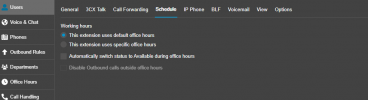
So, it was suggested that instead of leaving the user settings>schedule at "this extension uses default office hours", I apply the same hours individually per user using the "this extension uses specific office hours" setting.
This worked, and we saw each staff extension revert to DND when the office hours setting had been exceeded - BUT - it then set each extension to "Available" when business hours commenced the following day. This caused a little grief where the office manager would then have to individually reapply the individual settings for those staff who weren't in the office on that day.
(Hope this is making sense)
Then I belated realised I had applied the "Automatically switch status to available during office hours" setting for each user - which I then turned off.
So - now the extensions DON'T go into DND at the end of the business hours (which is what we want), and we don't know yet what will happen at the start of the next day with the individual Status
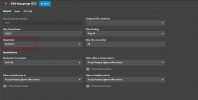
We have four (4) Departments incl. "Default", with all users in that group, plus nearly every user also resides in a Department called "AzureAD", where I've created a global address list for dialling common client numbers.
I've assigned each Department the same office hours setting (it's the same days and times always, at Global, User and Department levels)
There's every chance I'm looking at this the wrong way. Can anyone please point me to where I've got this wrong?
Many thanks in advance,
Cheers,
Ashley Draper
I have a client who is (now) running Version 20.0 Update 1 (Build 673 Beta). On the previous version, we had an issue where the global office hours setting was not being applied to the extensions as a whole, which meant that some staff where still getting calls directly to their DID's after hours. (The main number / ring group behaviour (not individual DID's) was as expected)
So, it was suggested that instead of leaving the user settings>schedule at "this extension uses default office hours", I apply the same hours individually per user using the "this extension uses specific office hours" setting.
This worked, and we saw each staff extension revert to DND when the office hours setting had been exceeded - BUT - it then set each extension to "Available" when business hours commenced the following day. This caused a little grief where the office manager would then have to individually reapply the individual settings for those staff who weren't in the office on that day.
(Hope this is making sense)
Then I belated realised I had applied the "Automatically switch status to available during office hours" setting for each user - which I then turned off.
So - now the extensions DON'T go into DND at the end of the business hours (which is what we want), and we don't know yet what will happen at the start of the next day with the individual Status
We have four (4) Departments incl. "Default", with all users in that group, plus nearly every user also resides in a Department called "AzureAD", where I've created a global address list for dialling common client numbers.
I've assigned each Department the same office hours setting (it's the same days and times always, at Global, User and Department levels)
There's every chance I'm looking at this the wrong way. Can anyone please point me to where I've got this wrong?
Many thanks in advance,
Cheers,
Ashley Draper