Solved Office Hours setup does not allow direct calls to agents

Status
Not open for further replies.

Kovacevic

SMB User
Joined
Oct 3, 2023
Messages
12
Reaction score
2
Hi Team,

I have an SMB system that has office hours from 8 am to 4 pm setup. During the period, all calls to the main number should be
routed to the Digital Reception. I have a need now for some agents to be reached directly, but unfortunately, all call are routed to the digital reception.

The agent has a direct number.

Is there any way to overcome this issue and make the agent accessible directly. All suggestions are welcomed.

Thanks in advance,

Uros Kovacevic.
 
Hi Team,

I have an SMB system that has office hours from 8 am to 4 pm setup. During the period, all calls to the main number should be
routed to the Digital Reception. I have a need now for some agents to be reached directly, but unfortunately, all call are routed to the digital reception.

The agent has a direct number.

Is there any way to overcome this issue and make the agent accessible directly. All suggestions are welcomed.

Thanks in advance,

Uros Kovacevic.
If the agent has a direct number, simply assign that DID to the user directly. It will bypass any office hours. Just make sure the user isn't set to switch status outside of hours.
 
If the agent has a direct number, simply assign that DID to the user directly. It will bypass any office hours. Just make sure the user isn't set to switch status outside of hours.
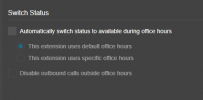
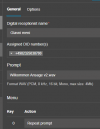
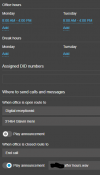
Hi, thanks for the quick response, you will see bellow the user setup.
Am I missing something ?

1707831063451.png
1707830996930.png
1707830939983.png
 
This should work but right now the only DID you have would route to the user and not your IVR anymore. You may want a second DID for the agent so that you don't lose the IVR.

The idea was to go around the IVR, to have direct access to the agent, I have checked on the provider side, and I can see that the correct number is sent to the system, but somehow I still cannot get around the IVR
 
The idea was to go around the IVR, to have direct access to the agent, I have checked on the provider side, and I can see that the correct number is sent to the system, but somehow I still cannot get around the IVR
Are you sure the DID is being sent in this exact format (looks like E164) ?
 
Are you sure the DID is being sent in this exact format (looks like E164) ?

The provider is using E164, here is a log on their side.
1707832056298.png
The yellow number is the target number.
 
It should be yes. Are you using a supported provider?
Off course, it is Reventix in Germany. Also in the call log, I can not see the call to that number, it shows only the IVR. I dont know is there another location that this can be setup. I have assigned the main number to the digital receptionist.

1707832558794.png
 
  • Like
Reactions: YiannisH_3CX
Did you follow the guide here: https://www.3cx.de/docs/sip-trunk/reventix/ ? Just to be sure.

As far as I see, it should route properly unless the DID isn't sent as E164 to 3CX (even tho their logs says so.)

Hi, as you suggested, I went through the config, the problem was on the Reventix setup.
Instead of +, I had 00 for international and that was causing the issue.

THANKS A LOT for the help and your time.

1707837145162.png
 
Status
Not open for further replies.

Members Online Now

Forum statistics

Threads
111,831
Messages
589,277
Members
164,660
Latest member
RJenkinsROCK