office hours

Mayur Patel

Silver Partner
Basic Certified
Joined
Oct 17, 2021
Messages
19
Reaction score
4
i have customer having one department with 3 x DIDs assign to ring group now. one of the DIDs needs separate office hours, is there way in same department possible?
As some of users are part of more than 1 DID, how do i achieve it ?
 
Would assigning the DID to the user and then set the schedule working hours to "This extension uses specific office hours" do the job?
 
Only the problem is that user also part of other DIDs and those have different timing hours. Also there are few users for this DIDs,
 
Then your best option might be to create a dummy extension that will control the hours and then route after to your ring group etc
 
  • Like
Reactions: fxbastler
Do you mean dummy ext having hours for that DIDs and pointing that user directly to Ring Group.

DIDs > Dummy ext with office hours in that ext > Ring group as forwarding

Something like that right ?
 
  • Like
Reactions: fxbastler
.. or a separate department with different working hours which gets the DID (or another RG which gets the DID for this department with diffent working hours) and so on
even a call script which triggers on incoming calls on the trunk and decides when and where to ring
so many possabilities

@Mayur Patel
we don't know your calls flows
 
  • Like
Reactions: VoIPTools
DIDs > Dummy ext with office hours in that ext > Ring group as forwarding

Something like that right ?
yes, dependant not only on that - also on your possible announcements (in case of OoO, break, holiday ...) which we don't know
 
Do you mean dummy ext having hours for that DIDs and pointing that user directly to Ring Group.

DIDs > Dummy ext with office hours in that ext > Ring group as forwarding

Something like that right ?
Yes
 
Requests like this are common. I wonder if it is time for us to create a calendar-based tool where you can setup recurring schedules with date/time-based routes. Just today I have seen 4 new requests for date/time-based routing in the forums.

We do very similar things in several of our tools. In my mind you would (1) select a department (or departments) from a list, (2) optionally select the desired DID, (3) display a web-based calendar, and (4) schedule where to route calls with recurring schedules with exceptions for holidays.

For example, I saw one post today where the person wanted to have a company meeting every other Wednesday from <start time> to <end time>. This would be possible on a recurring per-department/DID basis. You could use the same interface to set department office hours, holidays, break-times, exceptions, etc.

You could also have a "Duplicate schedule" option used when departments have very similar schedules, but with a few minor differences. This feature would make it simple to duplicate one department's schedule, then make minor changes for the specific department. We do this in our 3CX Audio Scheduler tool.

Perhaps it is time to start working through the common customer needs and design a UI to make this all "simple". An application like this would help the average partner/customer who does not have the expertise required to create a C# script or Call Flow Designer solution.

For example:
1770057873084.png

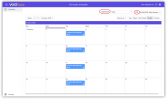
Above is a sample calendar screen (captured from our 3CX Audio Scheduler tool with one minor change to include a DID list in the upper-right corner). To define a route-schedule, you would select the desired department (or departments or all) and potentially the DID number. Once the selections are made, the calendar displays. This is where you enter the schedule, destinations, and for IVR destinations, we could include the prompt to play (nice for holidays etc.)

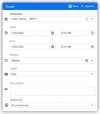
Below is what the route setup screen might look like (again pulled from our Audio Scheduler tool with minor cosmetic changes).
1770061840972.png

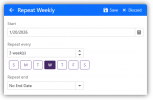
Here is how you would create recurring schedules (unchanged from our existing tool).
1770059681285.png

What am I missing? Is there some complication I have not considered that would make this more difficult than it seems? Do we need a trunk-level option, or are department-level schedules sufficient?

The one question I'm pondering now is "where" to apply this routing logic? Perhaps with a trunk-level script we install on the 3CX server? This script would call an API we provide that tells the script where to route the call based on the defined schedule?

Thoughts?
 
Interesting...Yeah, that every other Wednesday meeting, or the every 3rd Saturday open always comes up. What I have done recently to get around the open every 3rd Saturday (or for that matter, which ever Saturday) is to put the two operator extensions in a queue. on incoming calls during normal hours including Saturdays, if someone is logged into the queue, then they are open. If no one is logged in, then route to closed greetings. They just need to remember to IN/OUT the queue BLF on the phone.
 
Being dependent on a human to always remember a step is a guarantee that it will not work consistently. Software is not perfect either, but if well written, should be more dependable than a human.

My aspiration is to remove the complexities of creating c# scripts and Call Flow Designer applications to handle scheduled routing decisions, and replace them with a straightforward, if not simple, interface for managing the most common date/time routing scenarios.

Hopefully people here will offer their brain-power to improve my design. If we get enough interest/feedback, we can make it happen.
 

Forum statistics

Threads
111,953
Messages
589,914
Members
164,850
Latest member
masvty