On Premise

Support@refairappliancesr

SOHO User
Joined
Dec 18, 2022
Messages
7
Reaction score
0
Hi,

I have recently switched over my 3CX system from self-hosted via google VMs to on premise. I have a truenas server that I've installed a windows VM and installed 3CX on that. I am able to connect to the portal from anywhere, so FQDN is working properly. But the issue begins when I try to install the user on the mobile app. It connects to my server, but on the keypad page it keeps saying connecting. When someone calls, I get it on my phone through the app but cannot pick up and connect to the call, I am also not able to call anyone from that app. The voip phone is connected properly. I have tried all different things like reinstalling it from the beginning, but same issue keeps coming up. There are no errors on the system logs. The firewall is working perfectly.

Thanks,
Robin
 
Split DNS
 
Hello Support@refairappliancesr,

Does it change when using the mobile on the WIFI in the office or connecting from Mobile DATA (wifi off) ?

Paulo
 
When your PBX is in a Google VM, then ALL extensions are remote - and the FQDN will resolve to the public IP of the VM, and all is good if the firewall is in order.

BUT

When your PBX is IN THE LAN, then:

A remote extension (outside the LAN) will get your public IP Address when resolving the FQDN, and it can reach the PBX.

A local extension (inside the LAN) will get your public IP Address, and your network will try to route traffic OUT of your LAN to the public IP Address, and it needs to get routed back inside. This is harpinning, a notoriously troublesome setup, and a bad idea generally. Hence, Split DNS.

INSIDE the LAN, your internal DNS Servers need to give a LOCAL LAN IP Address to extension, so it can route/switch internally without the need for hairpin scenarios.
 
When your PBX is in a Google VM, then ALL extensions are remote - and the FQDN will resolve to the public IP of the VM, and all is good if the firewall is in order.

BUT

When your PBX is IN THE LAN, then:

A remote extension (outside the LAN) will get your public IP Address when resolving the FQDN, and it can reach the PBX.

A local extension (inside the LAN) will get your public IP Address, and your network will try to route traffic OUT of your LAN to the public IP Address, and it needs to get routed back inside. This is harpinning, a notoriously troublesome setup, and a bad idea generally. Hence, Split DNS.

INSIDE the LAN, your internal DNS Servers need to give a LOCAL LAN IP Address to extension, so it can route/switch internally without the need for hairpin scenarios.
How can i fix this issue with the DNS?
 
on the LAN, PBX FQDN needs to resolve to PBX LAN IP, while on internet FQDN needs to resolve Public IP of your Internet access where the pbx is located. Of course i Guess your pbx firewall check is passed green?
Most probably actually FQDN should resolve to public IP only ?
to confirm this , if you do a nslookup FQDN what do you get?

As you said you have a truenas server , add a new VM with a pihole distribution acting as DNS on the LAN and set it adding a A record to point as needed and your problem should be fixed
 
  • Like
Reactions: Evolute IT
on the LAN, PBX FQDN needs to resolve to PBX LAN IP, while on internet FQDN needs to resolve Public IP of your Internet access where the pbx is located. Of course i Guess your pbx firewall check is passed green?
Most probably actually FQDN should resolve to public IP only ?
to confirm this , if you do a nslookup FQDN what do you get?

As you said you have a truenas server , add a new VM with a pihole distribution acting as DNS on the LAN and set it adding a A record to point as needed and your problem should be fixed
Hi, so basically most of the issue is fixed. I am able to receive calls on the phone and it says ready for call on the mobile app and also able to call other people, but only while I am connected to the network. When I switched to 5G data to test it, it stopped working like before.
 
Hi, You didn't explained what you did exactly to partially fix it (as you said) , we can't guess all the possible scenari you can encounter ;) give us details and perhaps we could help you more precisely.
 
Hi, You didn't explained what you did exactly to partially fix it (as you said) , we can't guess all the possible scenari you can encounter ;) give us details and perhaps we could help you more precisely.
I basically did what you recommended, setup a new VM with pihole and added the ip address and it made it so i am able to at least connect and receive calls on the app on the network but does not when outside the network.
 
I basically did what you recommended, setup a new VM with pihole and added the ip address and it made it so i am able to at least connect and receive calls on the app on the network but does not when outside the network.
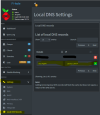
Ok if you set a pihole did you create an entry in Settings/Local DNS Records, if no, then go there and add a new domain entry with 3CX FQDN and link it with the local LAN IP of the PBX.
1777106351070.png

After the setting is done, check from local LAN with a nslookup 3CX FQDN you need to get local PBX IP, then simulate a check from outside with a nslookup 3cx fqdn 8.8.8.8 you should get your WAN public IP .

if all good then everything is ready. 3CX devices should work from outside or LAN. Of course this is also needed to NAT the right ports ou your router, and from 3CX console, firewall test must be green.
 
Last edited:
  • Like
Reactions: bitn2

Members Online Now

Forum statistics

Threads
111,832
Messages
589,286
Members
164,662
Latest member
DejanMDS