On premises Linux 3cx v20 update 3 Can Not change Storage settings

dyntech

Free User
Joined
Mar 28, 2007
Messages
162
Reaction score
0
I had to restore from backup. Immediately after restoring, I was able to make changes to the Storage settings but it still could not connect even though I was using the same settings that worked before. After updating to Version 20 update 3, I can no longer make any changes to the storage settings because they are greyed out.
 
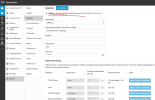
Did you tick this option? You need to activate the storage.1728910288409.png
 
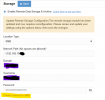
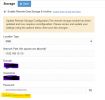
I have it on now. Could not see it before it was poionted out! However, I can now configure the setttings but constantly get a message that says "Connot connect to SMB". I have tried everything to fix this: reset the password, try different variations of the path name, including the folder name in the path, etc. Nothing works. There must be something else that is different in this version that I am not aware of.

1729037142558.png
 

Attachments

  • 1729037097225.png
    1729037097225.png
    28.8 KB · Views: 5
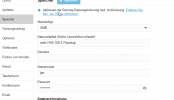
Your path is wrong, smb needs to be like this: 1729059794507.png
 
I think before the upgrade, my path is SMB://NAS_Hostname, without the folder name? Is this correct?
 
I think before the upgrade, my path is SMB://NAS_Hostname, without the folder name? Is this correct?
No, just like my screenshot.
 

Members Online Now

Forum statistics

Threads
111,835
Messages
589,291
Members
164,668
Latest member
Infinity Network