Open AI / Whisper - can it summarise conversations / recap?

Status
Not open for further replies.

hlfb

SOHO User
Joined
Oct 1, 2021
Messages
26
Reaction score
2
Hi,

I have the integration working and it is now transcribing all of the calls, however its literally just transcribing, does anything exist now where this can be summarised for call journaling or note taking with any key points?

Thanks
 
Yes it does do sentiment analysis as well.

You will be able to see this information in the reports and recordings pages

https://www.3cx.com/docs/manual/openai-transcription/

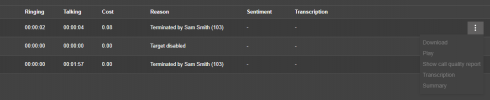
Click the 3 dots on the right hand side and select the summary to see the summary. The sentiment score and the transcription will be visible on the main page

1725545839660.png
Please note that I do not have the AI integration configured on my machine here.
 
  • Like
Reactions: Evolute IT
We have a new version of our 3CX Recording Manager tool that allows you to ask any questions of your recordings automatically. By default, we transcribe, summarize, identify key points and action items, appointments, agent scoring, and sentiment. But you can create your own prompts. You can activate/deactivate individual prompts, you can control which extensions are analyzed automatically, or perform the analysis only on specific recordings. Having granular control over which recordings are analyzed helps to manage AI costs. For those people who still want to perform agent scoring manually (although I don't know why you would) we now provide a graphical representation of the audio file so you can skip over long periods when a caller was placed on hold. Ask me for a demo. You will be amazed.

Available for V18 too!
 
Yes it does do sentiment analysis as well.

You will be able to see this information in the reports and recordings pages

https://www.3cx.com/docs/manual/openai-transcription/

Click the 3 dots on the right hand side and select the summary to see the summary. The sentiment score and the transcription will be visible on the main page

View attachment 43676
Please note that I do not have the AI integration configured on my machine here.
ahh yes I can see this now, but can this be accessed by a user, or do you have to be an admin?
 
We have a new version of our 3CX Recording Manager tool that allows you to ask any questions of your recordings automatically. By default, we transcribe, summarize, identify key points and action items, appointments, agent scoring, and sentiment. But you can create your own prompts. You can activate/deactivate individual prompts, you can control which extensions are analyzed automatically, or perform the analysis only on specific recordings. Having granular control over which recordings are analyzed helps to manage AI costs. For those people who still want to perform agent scoring manually (although I don't know why you would) we now provide a graphical representation of the audio file so you can skip over long periods when a caller was placed on hold. Ask me for a demo. You will be amazed.

Available for V18 too!
looks interesting, I will see if I need this going forwards and come back to you for a demo.
 
The Parameter "OPENAI_SUMMARY" can be amended for the OpenAI response.
 
  • Like
Reactions: Evolute IT
ahh yes I can see this now, but can this be accessed by a user, or do you have to be an admin?
Currently the end user can only see the full transcription in the recordings tab. The summary as far as I tell is only available in the admin call log. I'm assuming this is something that 3CX will add to the recordings tab eventually as that would make sense, I did bring it up to our rep when we were testing, but not sure if it ever got communicated to the dev team...
 
Currently the end user can only see the full transcription in the recordings tab. The summary as far as I tell is only available in the admin call log. I'm assuming this is something that 3CX will add to the recordings tab eventually as that would make sense, I did bring it up to our rep when we were testing, but not sure if it ever got communicated to the dev team...
To me, it makes more sense happening the other way around. thanks for the info.
 
Hi, so this is really important to get the sentiment for a couple of users, how do I give them access, I presume they will need sys admin role but when I give this level of access there is no recordings button?

Hopefully 3CX can update this ASAP as its a bit pointless having this functionality only available to an admin!

Thanks
 
The reports are also available to managers, so they can see what their team has been talking about on the phone.
 
OK, so just make them a Manager of the default group? I have done that but still not showing in admin?
 
A Manager extension should be able to see the reporting section in the admin console, for their department(s)

1725874198751.png
 
A Manager extension should be able to see the reporting section in the admin console, for their department(s)

View attachment 43715
It would be great if the "summery" was in the IOS and android app, more and more of our clients are solely using the phone app.
 
Status
Not open for further replies.

Latest Posts

Forum statistics

Threads
111,953
Messages
589,917
Members
164,851
Latest member
DrunkeMeister