Solved OS Upgrade Available

Status
Not open for further replies.

complex1

Customer
Advanced Certified
Joined
Jan 25, 2010
Messages
1,141
Reaction score
128
Hi,

I have a 3CX v15.5 SP6 running on Debian 8 hosted by OVH.
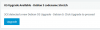
Now I get a Update message to Upgrade to Debian 9.
3CX was not installed using the 3CX ISO or PBX Express, but by hand on a preinstalled Debian 8 on a OVH VPS (03-aug-2017).

What I like to know, is it possible and save to upgrade to Debian 9 this way without running into issues or do I follow a other upgrade path?

Thanks in advance for the help.
upload_2018-9-5_11-47-33.pngupload_2018-9-5_11-47-49.png
 
In theory you should be fine to upgrade to 9 but I wouldn't risk trying the 3CX upgrader as it specifically states it will not work under your circumstances. That's just asking for trouble and you could end up with anything from a simple error message (likely) to a broken PBX (less likely but still possible).

You could do a manual OS upgrade from the command line following the same procedure outlined (backup, uninstall 3cx, upgrade, reinstall 3cx, restore) pretty easily. It will probably be fine but, in my experience, there are no guarantees everything will come back up and working perfectly after an in place debian upgrade. Even other people trying it successfully is no guarantee it will work for you as there are often quirks in configurations / dependencies that can trip the upgrade up.

However, as long as you've backed 3CX up to somewhere external then it shouldn't be that big of a job to completely rebuild the PBX should the worst happen. And if disaster does strike, maybe this is an opportunity to install from the 3CX ISO so you don't have the issue next time :).
 
Hello @complex1

As stated in the upgrade notification this will not work for you, or you may run into issues by doing so. I would recommend performing a backup before taking any action and saving it to an external location but i would also recommend going to Debian 9 as update 6 was build on Debian 9. We do have another method for upgrading Debian outlined in the guide below.
https://www.3cx.com/blog/docs/upgrading-debian/
 
Hi,

Thank you for the replies.

Next weekend I will use the backup, OS upgrade, restore procedure and post the outcome to the forum.
 
Let us know of the results
 
Hi,

Here is my feedback, as I have promised.
For a successful upgrade from Debian 8 to Debian 9 on an OVH VPS, I have taken next steps. It is not difficult at all, no sneaky things or hidden settings.
1. Backup existing configuration (incl. FQDN and Lic key) and store it on save place
2. Remove 3CX from the VPS
3. Login to your OVH account and select “reset VPS”. Here you can change the OS
4. Install 3CX according https://www.3cx.com/docs/manual/installing-debian-linux-pbx/
5. Restore configuration
6. Done in less than 30 minutes
 
  • Like
Reactions: Lee Cramman
Thank you for the update and glad to see the system is successfully upgraded.I am sure this will help many users trying to do the same.
 
Status
Not open for further replies.

Latest Posts

Forum statistics

Threads
111,893
Messages
589,599
Members
164,763
Latest member
Techmansam