Outbound rule problem with Fax extensions

Status
Not open for further replies.

SHP

Customer
Joined
Jul 15, 2022
Messages
14
Reaction score
2
  • 3CX Version, 20.0 Update 0 (Build 1620 Release)
  • Server OS, Debian 12
  • Is the 3CX Server Hosted and where? on-premise virtual machine
  • IP Phone Make/Model/Firmware version, Fanvil X3S(G)
  • Provisioning Method: Local
  • Trunk Provider or VoIP Gateway Make/Model, Voxtelesys
  • Has the Firewall Checker passed: YES
  • Are custom Phone Templates being used: NO

Hi,

We recently upgraded to V20 (from V18) and it worked fine for the most part, but we found an issue with an outbound rule for our Fax machines (we use analog via FXS Grandstream GXW 4216). The analog phones (including the FAX extension 8800) can make and receive phone calls just fine with the general outbound rules. The one that does not work is a specific outbound rule for the fax machine to change their Caller ID to specific Fax numbers.

So as soon as the outbound rule is set with a Fax extension (8800) as shown in the screenshot below, calls fail and this error show up in the event log: There was no user or outbound rule found for the number XXXXXXXXXX that Fax.8800 dialed.

Below is a list of what I have tested:
  1. If I change "calls from extension" to a non-fax extension number, the outbound rule works fine
  2. If I remove the "calls from extension", the fax machine calls works (but it will be using the trunk's CID).
  3. Changing the order of the outbound rules, on top or on the bottom of the list, no difference.
So the problem seems to be with having a fax extension number in the "calls from extension" field.

Currently we have a work around by using a prefix number to change the outbound caller ID, but we prefer the previous way that worked fine in V18.
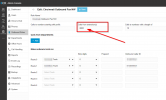
1709570595465.png


Thanks
 
Yeah same issue here and your workaround didn't work for me.

Completely regret the upgrade and this is final version... lovely.
 
Yeah same issue here and your workaround didn't work for me.

Completely regret the upgrade and this is final version... lovely.

Did you remove / leave blank the "Calls from extension" field? The workaround idea is not to use that field, and instead use prefix (and then strip the prefix's digit) to indicate that we want a different outbound caller id. It is annoying but we dont use fax that much so not a major setback for us.

This is how we do the outbound rule workaround for fax that works for us (This particular rule, the prefix is 9 and 10 digit number):
1709818219012.png
 
  • Like
Reactions: LAvoip
Did you remove / leave blank the "Calls from extension" field? The workaround idea is not to use that field, and instead use prefix (and then strip the prefix's digit) to indicate that we want a different outbound caller id. It is annoying but we dont use fax that much so not a major setback for us.

This is how we do the outbound rule workaround for fax that works for us (This particular rule, the prefix is 9 and 10 digit number):
View attachment 40162
This just worked for me finally. Thx
 
Hi @SHP

same problem here.
I am not clear how I could add a prefix nummer to all outgoing calls from the fax extension. Could you give me a hint?

Thank you
 
Hi @SHP

same problem here.
I am not clear how I could add a prefix nummer to all outgoing calls from the fax extension. Could you give me a hint?

Thank you
instead of dialing 1-222-333-444 have your users dial 41-222-333-4444 if 4 is the prefix number.
 
Hi @SHP

same problem here.
I am not clear how I could add a prefix nummer to all outgoing calls from the fax extension. Could you give me a hint?

Thank you

Yes as @SweetAction said it is not added automatically but your users will add the prefix manually every time they want to send Fax. Hopefully 3CX will fix it soon.
 
Yes as @SweetAction said it is not added automatically but your users will add the prefix manually every time they want to send Fax. Hopefully 3CX will fix it soon.
Some ATAs and/or fax machines can auto-add prefixes, but that is device specific.
 
OK, I see. Thank you
 
Is there any solution for this bug announced from 3CX?
 
  • Like
Reactions: team-it and SHP
Update 3cx to Update1 and the outbound rout will work again with normal settings.
 
Do you get the same massage again?
 
Status
Not open for further replies.

Forum statistics

Threads
111,953
Messages
589,915
Members
164,850
Latest member
masvty