PA2 - Analog switching to change inputs

Status
Not open for further replies.

Alphabetic

3CX MVP
Silver Partner
Advanced Certified
Joined
Jul 1, 2016
Messages
6,533
Reaction score
2,558
Hi guys

does anyone know of a way or device to use with the PA2 that will allow for signals to be switched?

We have a DAB radio with analog LR going into a box that the existing (old) phone system is connected to.

I believe when the extension is rung, theres a current sent down the rj11 which must either disable or switch the DAB and allow for output.

I basically need the DAB radio to stop whilst announcement is played. I dont think we can retro fit current solution as its on their old phone system.
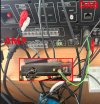
 
It's a bit of a mess tbf..

the blue box in the image also has some play in it.
 

Attachments

  • 1727274562987.png
    1727274562987.png
    1.2 MB · Views: 10
what model Amp is it? Does the Amp have a TEL input? On some Amps, the Tel input will mute all other inputs when it detects audio above a set level.
 
what model Amp is it? Does the Amp have a TEL input? On some Amps, the Tel input will mute all other inputs when it detects audio above a set level.
It's a PA-312DMP
 
OK, So looking at it, you need to have the phone system connected to MIC 1 on the front. When audio is input on this you adjust the "MUTE LEVEL" to mute the other inputs.
 
OK, So looking at it, you need to have the phone system connected to MIC 1 on the front. When audio is input on this you adjust the "MUTE LEVEL" to mute the other inputs.
Would this work if I used one of the Mics on the back? I dont have a microphone cable w/ jack on
 
Would this work if I used one of the Mics on the back? I dont have a microphone cable w/ jack on
From what I have read it's just the MIC 1 input, there's no way to change it.
 
You'll have to get/make a cable or get an adapter to go from XLR to 1/4". I see you are based in the UK, Curry's if there is one near you may have what you need. Or this is the adapter on Amazon, Amazon XLR to 1/4"
 
It's going from the Fanvil PA2 to the AMP. I've had a look at the manual and the EM input on the back does the same as Mic1 so i'm going to wire in to that and see how it goes. I'm confident its going to work though, thanks for your help.
 
Ok, the EM input is a line level input, Don't know if the speaker out(Has Volume Control) would have a high enough audio level out, so you may want to use the headset output on the PA-2, which is a line level out (No volume control).
 
Ok, the EM input is a line level input, Don't know if the speaker out(Has Volume Control) would have a high enough audio level out, so you may want to use the headset output on the PA-2, which is a line level out (No volume control).
ok interesting..

It'll still work though via EM input? Even if it's just to ensure it does work.. worse case scenario is that is sounds crap? i'll still need a 1/4" jack with 2 wires to come from the PA2?
 
ok interesting..

It'll still work though via EM input? Even if it's just to ensure it does work.. worse case scenario is that is sounds crap? i'll still need a 1/4" jack with 2 wires to come from the PA2?
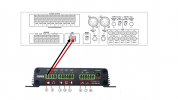
Yeah the EM will work after reading the manual more. It just requires a line level input, so the Master volume on the Amp is the only volume control. You should be able to just use a pair of wires on the screw terminals of the PA2 to the terminal block on the Amp. Shouldn't needs any connectors on the wire. If you can't get a high enough volume using the Speaker output try the headset.
PA2-PA312DMP.jpg
 
Yeah the EM will work after reading the manual more. It just requires a line level input, so the Master volume on the Amp is the only volume control. You should be able to just use a pair of wires on the screw terminals of the PA2 to the terminal block on the Amp. Shouldn't needs any connectors on the wire. If you can't get a high enough volume using the Speaker output try the headset.
View attachment 44146
perfect, thank you.
 
  • Like
Reactions: RCCradio
At first I didn't consider the EM, because on some Amps, there is a MUTE/Emergency input, which when shorted mutes all inputs except input 1, so I thought this was the same.
 
At first I didn't consider the EM, because on some Amps, there is a MUTE/Emergency input, which when shorted mutes all inputs except input 1, so I thought this was the same.
Just onsite testing now and the music cuts out but there's no audio coming down it. Any ideas?
 
Which connection on the PA-2 did you use? Speaker or headset, if you used speaker, did you turn the volume up on he PA-2, also try adjusting the MIC1 volume. If the speaker output doesn't have sound, try the headset output. You'll have to make sure you have "Enable Headset" checked in the "Intercom", "Features" tab. Also in the "Intercom", "Audio" tab, is a setting for the external speaker, it looks like this should be set to "External Speaker" and start with the lowest value in the "External Speaker Power."
If this doesn't work, you may need to get a 1/4" plug and try the MIC 1 input on the front.
 
Morning.

We Initially used the speaker output on the PA2 which didnt work. Then used the headset output which appears to work. However, I also messed around in the GUI changing from "external speaker" to "panel speaker" not sure if that helped. I did have a problem with the PA not "ringing" when SIP2 account was rung too.
 
Glad to hear you you got audio. The "Panel Speaker" allows for 2 way audio, like a intercom from the speaker. So you would wire the mic and speaker connections to an intercom box, so the other end can talk back.
 
Glad to hear you you got audio. The "Panel Speaker" allows for 2 way audio, like a intercom from the speaker. So you would wire the mic and speaker connections to an intercom box, so the other end can talk back.
ah okay. So I should go back in to the speaker output and flick the setting to external on the lowest as you said?

we'll be going back again for further testing of the volume etc. I just need to get that ringtone to play when SIP2 is being rung (auto pickup is off).
 
Unless you need to be able to adjust the volume, otherwise If it's working I wouldn't worry about the audio settings, this only affects the speaker output not the headset.

I;m not familiar with the set-up in the PA2, but looking at the manual, it looks like there aren't separate "Intercom" settings for the lines, looks like it's a universal setting.
 
Status
Not open for further replies.

Members Online Now

Forum statistics

Threads
111,835
Messages
589,288
Members
164,665
Latest member
dominik.pepel