Patton SN4112 voip gateway configuration issue with 3CX ver 20

Kane Wong

Free User
Joined
Oct 13, 2018
Messages
233
Reaction score
9
Hello;
I am building my new 3CX on prem with version 20 with my Patton SN4112 FXO Analog gateway, the same FXO device was used with 3CX version 18 before without issue.

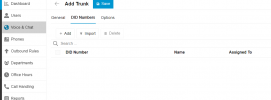
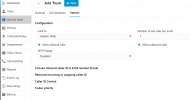
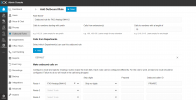
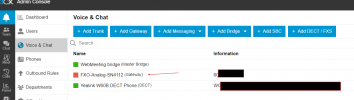
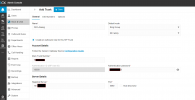
I configured a new Gateway in "Voice & Chat" group, however; I found that the connection looks like failed because the light is RED, not GREEN. (see my attached pictures).

Am I using the wrong way to connect my FXO unit to 3CX?

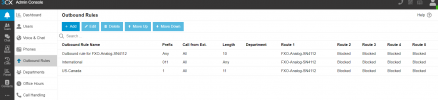
At time of adding gateway, I have created few Outbound Rules also.

How can I export this gateway configuration from 3CX and import to Patton FXO for register with 3CX?
 

Attachments

  • gateway-0.png
    gateway-0.png
    44.1 KB · Views: 28
  • gateway-1.png
    gateway-1.png
    75.5 KB · Views: 27
  • gateway-2.png
    gateway-2.png
    27.6 KB · Views: 26
  • gateway-3.png
    gateway-3.png
    43 KB · Views: 25
  • gateway-outbound-rule-1.png
    gateway-outbound-rule-1.png
    86.3 KB · Views: 23
  • gateway-outbound-rule-2.png
    gateway-outbound-rule-2.png
    57.5 KB · Views: 25
Did you ever get this figured out? Have a project with same thing going on right now that isn't working.
 
Are you using a locally hosted PBX?
Have you looked at the 3CX Activity Log to see any registration or outbound call issues?
 
Did you ever get this figured out? Have a project with same thing going on right now that isn't working.
Not yet, still looking at this issue.
 
I have the same Issue with 3CX version 20. It is not working with Patton SN4141 FXO... the system can only receive inbound calls, not make outbound calls.
 
Well changed out the license, deleted V20 and rolled V18 on a local windows machine and voila it was a breeze to get working.
 
I have the same Issue with 3CX version 20. It is not working with Patton SN4141 FXO... the system can only receive inbound calls, not make outbound calls.
This is why you need to look at the 3CX Activity Log.. Outbound calls are routed to an IP that you have put in the trunk settings, it doesn't use registration information like an ATA.. This is normally a local IP.

If you are trying to send to a remote gateway, then there could be issues if the gateway is located behind a router.
The Activity Log will show if an outbound call matches the rules and where it actually goes, the IP and port number..
 
Last edited:
Hi, how did You solve this part?

How can I export this gateway configuration from 3CX and import to Patton FXO for register with 3CX?

I'm in the same situation, I've to update the configuration to V20, and from that point on all my problems started.
Now I want to configure this Patton, and there seems to be no way to generate the configuration file that must be imported in Patton (in the V18 version, it was possible to generate it)

Do You have the configuration file? So I can change some parameters and import that in Patton
Thanks
 
Hi, how did You solve this part?


I'm in the same situation, I've to update the configuration to V20, and from that point on all my problems started.
Now I want to configure this Patton, and there seems to be no way to generate the configuration file that must be imported in Patton (in the V18 version, it was possible to generate it)

Do You have the configuration file? So I can change some parameters and import that in Patton
Thanks
Follow the guide here. https://www.3cx.com/docs/manual/configuring-voip-gateway

Step 3.1 will give you the configuration file
 
Follow the guide here. https://www.3cx.com/docs/manual/configuring-voip-gateway

Step 3.1 will give you the configuration file
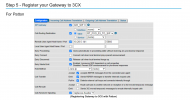
Hi Nicholas, Followed the steps in that guide, but the config page that step 5.1 is referring to is not the same. This is the current web wizard page that the Patton gateway is using.

I tried also following the Web Wizard for the Patton Gateways, but it fails password authentication and won't allow a usable configuration file to generate and upload.
 

Attachments

  • Screenshot 2025-06-21 at 8.07.51 AM.png
    Screenshot 2025-06-21 at 8.07.51 AM.png
    515.2 KB · Views: 11

Members Online Now

No members online now.

Forum statistics

Threads
111,832
Messages
589,286
Members
164,662
Latest member
DejanMDS