• We do not provide troubleshooting help for unsupported phones. Please try with a supported phone.
  • V20 Update 10 Alpha 2 Learn more

Unsupported Paxton intercom configuration?

Status
Not open for further replies.

Moz

Bronze Partner
Basic Certified
Joined
Sep 26, 2018
Messages
48
Reaction score
5
Hi All,

Can anyone share their configuration steps for getting a Paxton intercom to work with 3CX?

I have created an extension, got the intercom registered but when someone buzzes at the front door it rings an agent but hangs up when they answer.

I currently have the address book on the intercom directed to a ring group.

Thanks,

Adam
 
I am getting the following in the logs:

Reason: SIP;text=Application Rejected Sdp(usually no common codec)

SIP/2.0 488 Not Acceptable Here

Both sides have the required codecs available as far as I can see so not sure why it is being rejected.
 
Hi John,

I understand that it is not supported but I have seen various posts in the forum where people have said "got it working fine" for audio which is all I need at the moment.

I used that article to get the device registered, it shows in 3CX as green as "available". I can click an ID on the door entry device and it will call the ring group, it seems to fall over during the call setup/answer.

I'm trying to find out what others have used on their configs, PBX Delivers Audio, disable video etc for example, as leaving the defaults with the exception of "block outside of LAN" (which I know we need off) does not seem to work.

Is there anything else in the logs I can check? I have numerous clients who have had Paxton systems for years and are very happy with them. I am just trying to make use of what they have with their mostly new 3CX platforms.

Thanks,
 
Hi Moz,

Unfortunately we cannot provide more help, but hopefully other members can chip in.


Since you already registered though, some general advice that may be of use:

- Look with Wireshark and see what SIP messages are being exchanged
- You can compare a failed call for the unsupported device versus a successful call of a supported device
- Best to send the call directly to an extension first rather than complicating things with a ring group
- Notice who of the two is sending the 488, and what message preceded it
- Use G.711 (PCMU) as the top codec on both the phone and the device
 
Hi John,

Yep, really waiting to see someone who has these setup in the wild reply as I know they are out there :)

I will investigate some of those ideas, I thought going direct would be a good test. I did hope the logs would help to direct us to known issues.

Fingers crossed someone sees this but I will update.

Cheers,
 
  • Like
Reactions: JohnS_3CX
I have a system working, make sure call time is of time that will allow for the call to be sent trough to the number that its calling and allow time for them to answer.
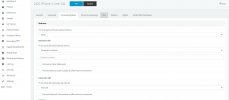
The way I have set this one up is all the extensions that are in the Intercom door unit are in the 3CX system as a ring group and each unit is setup as an extension itself. I then set these extensions to away and when "away" forward to a number (which is a cell number at this time) don't use the forward to a cell option because with thi sit will not pass the DTMF tones back to open the door.
When you input the forward to number type number straight in don't use dashes (I.E. 12344567899 not 123-456-7899)
Once I find my other post where I posted some screen shots I will forward it in this one.
 
Hi Videopbx,

I have the Paxton entry device setup and registered as an extension in 3CX. The normal 3CX users extensions are setup using a mixture of 3CX web client and 3CX app (iOS and Android), not added mobile phones (native) to the mix yet.

The Paxton entry device has a phone book which contains IDs that are configured to call a ring group of 3CX agents (users). The Paxton entry device rings all the agents fine but when anyone answers it hangs up immediately.

It feels like a conflict of codecs but all extensions have the required PCMU/PCMA available which is what Paxton uses. I'm just trying to get audio working so that an agent can say "hello" and then DTMF the user in via option 1. I have read load of posts about people trying to get video working stating that audio is fine so just trying to find out what I could be missing.

Would you be able to let me know if you have made any special changes to the extension used for your Paxton entry device or did it just work after it was registered?

Thanks,
 
Last edited:
Our configuration is local host on same network.
we are using a internet sip provider ,one that is listed by 3CX.
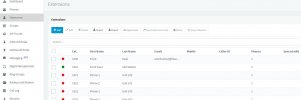
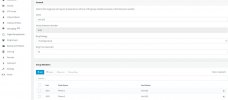
this system is in a multi unit complex(200), the way I set up 3CX is each unit has two extensions and those extensions are in a ring groups. each extension is hard set to "AWAY" and a rule is made when "AWAY" dial number and this number is , in most cases a cell number..(not in the cell phone field) .
the ring time is set to 15 secs which will usually ring the number at least 4 times.
The Paxton intercom door station in this case is a touch screen which is nice but should not make a difference.
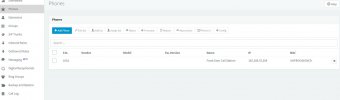
here are some screen shots of some of the key 3CX areas.
 

Attachments

  • Capture.JPG
    Capture.JPG
    63.1 KB · Views: 53
  • forwarding.JPG
    forwarding.JPG
    84.4 KB · Views: 48
  • phone.JPG
    phone.JPG
    53.8 KB · Views: 48
  • ring group.JPG
    ring group.JPG
    78.8 KB · Views: 45
  • status.JPG
    status.JPG
    50.2 KB · Views: 46
Status
Not open for further replies.

Forum statistics

Threads
112,147
Messages
590,959
Members
165,167
Latest member
Finatra.us