PCI scan failed (CVE-2021-3618 - ALPACA Issue)

Status
Not open for further replies.

3CXusername

Joined
Jul 31, 2014
Messages
186
Reaction score
17
* Running the latest Linux 18.0 (Build 908)
* PCI compliance enabled on system (SSL/SecureSIP Transport and Ciphers)
* using Let's Encrypt cert
* openssl version 1.1.1n 15 Mar 2022

Anyone else have this issue when doing PCI scanning? Is there a fix?

Our scan vendor says to upgrade to latest version of application: This vulnerability has been fixed in the following versions:
vsftpd 3.0.4
nginx 1.21.0
sendmail 8.17
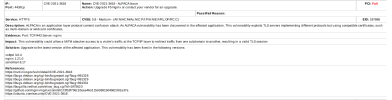
1678982240608.png

thanks
 
if you ssh into your box and run nginx -v what version is your PBX running? Is it 1.14.2?
Do you have auto-updates in 3CX turned on?
 
yes nginx 1.14.2
no auto-updates (though if i apt-get update everything is current)
 
Looks as though you have port 443 open inbound on your firewall, close that and should pass the next scan
 
Looks as though you have port 443 open inbound on your firewall, close that and should pass the next scan
Yeah, but the management console, webclient, presence information in mobile apps and bridges, SMS, etc will also stop working.
 
would be a limiting work around but tcp/443 inbound is needed for presence and provisioning
 
Only if you changed the default 5001 port to 443 on initial installation. If thats whats happened here, theres 3 options:

1. re-install using port 5001
2. lock firewall rules down to known IP addreses (hard to do with remote apps being used)
3. plead your case with PCI and express that you need that port open inbound

Port 443 is fine to be open for outbound traffic, its the inbound rule that's being flagged up.
 
Only if you changed the default 5001 port to 443 on initial installation. If thats whats happened here, theres 3 options:

1. re-install using port 5001
2. lock firewall rules down to known IP addreses (hard to do with remote apps being used)
3. plead your case with PCI and express that you need that port open inbound

Port 443 is fine to be open for outbound traffic, its the inbound rule that's being flagged up.
3CX has been recommending installing on port 443 for a few years now.

Having 3CX on 5001 won't fix the issue - it's just the PCI scan will trigger on port 5001.
 
443 is an option but obviously not the preferred one as its not the default port upon installation.

I think you'll have more of a chance of winning the argument with PCI having 5001 open instead of 443
 
They dont like the fact that a very very common port is open towards your network
 
what are the odds of 3CX upgrading nginx version?
 
Its a stable version so should be on the cards??
 
yes nginx 1.14.2
no auto-updates (though if i apt-get update everything is current)
3CX won't update anything system side unless auto update is on.
See: https://www.3cx.com/community/threa...led-via-automatic-updating.79651/#post-367011

Looks like on Debian 10 this is the latest version: https://packages.debian.org/buster/nginx so I'm unsure what 3CX can do (they don't make nginx for debian).

I recommend a read through this as well: https://lists.debian.org/debian-lts-announce/2022/11/msg00031.html

It's explained that nginx is patched in this version (1.14.2-2+deb10u5) against this CVE but I would guess your CVE checker is just blindly saying "needs to be a newer version because large numbers". Something to look into.

443 is an option but obviously not the preferred one as its not the default port upon installation.

I think you'll have more of a chance of winning the argument with PCI having 5001 open instead of 443
According to 3CX 443 is the preferred port.
Any PCI tester that goes "Ah yes, you changed the port, security through obscurity is a valid defense" is insane.

They dont like the fact that a very very common port is open towards your network
Most common SSL port in the world, I guess everyone else should stop using 443?
 
3CX auto-update for server side Debian updates isn't the same as apt-get update?
 
3CX auto-update for server side Debian updates isn't the same as apt-get update?
I can't speak to that.

3CX's official stance is that 1. you don't ever run apt-get upgrade as it may break stuff and 2. if you want OS upgrades you use the auto-update. You can turn auto-update off and only turn it on when ready to upgrade, but only auto-update will patch the OS.
 
thanks i'll try their auto-update to see if that makes any difference to nginx. Do you have same nginx 1.14.2 I have?
 
thanks i'll try their auto-update to see if that makes any difference to nginx. Do you have same nginx 1.14.2 I have?
I do, the version that is patched against this CVE.
 
I let 3CX "auto-update" and nothing changed on nginx -v. PCI still reporting CVE.

3CX is newer NGINX planned in future update?
 
@3CXusername So is your scanning company saying the Debian advisory saying it's fixed, is incorrect? In my experience (and as noted above) scanners get stuff wrong all the time by just looking at version numbers or other identifiers. Red Hat/CentOS are known for not incrementing version numbers when they patch released software for example. I personally would trust the updates that are installed over trusting a scanner's findings.
 
I let 3CX "auto-update" and nothing changed on nginx -v. PCI still reporting CVE.

3CX is newer NGINX planned in future update?
That version of nginx is the latest version for this release of Debian. It is patched against this CVE. There is no further update for 3CX to take besides for updating to a newer version of Debian. 3CX doesn't make Debian or nginx.

You scanning tool is incorrect here.
 
Status
Not open for further replies.

Forum statistics

Threads
111,974
Messages
590,081
Members
164,899
Latest member
mazet