Personal status message with 3CX - does it exist?

Status
Not open for further replies.

JakeC

Joined
Jun 11, 2018
Messages
21
Reaction score
0
Hi

Looking into purchasing 3CX but want to make sure it has a key feature which is available on my current Innovaphone system.

Is it possible to add a personal status message, i.e. what I'm currently doing? I saw that a default status like "Away", "Busy" as well as two additional system-wide statuses can be used.

But is there also a possibility to write a quick note like "In Showroom with customer A" or "Today @ Home Office" which is then shown to all users in the desktop app and/or on the Yealink phone?

Thanks.

12-0.png
 
The individual statuses are set by default, however I know of some integration partners who offer this sort of this functionality (JBH Works is one I know that does offer multiple customized status's):
https://www.3cx.com/call-center/crm-integration/

As far as a custom status is concerned check the soft client there maybe a way of setting a global one but not per status setting I don't think.
 
You can add a custom status message to the status which everyone can see if they are using 3CX Windows or 3CX Web client

For example, you can set your status to away, with custom status message of 'Enjoying two weeks in the sun'
 
Last edited:
  • Like
Reactions: JakeC
In the 3CX app, you can add a custom status message to the status which everyone can see.

For example, you can set your status to away, with custom status message of 'Enjoying two weeks in the sun'

Same applies for the 3CX WebClient,

Nice, I tried finding a screenshot where it is illustrated but couldn't find any. Does anyone perhaps have one showing this feature?

Also, is the custom status message such as 'Enjoying two weeks in the sun' shown on desk phones like the Yealink T48G? Or can those only show the default status like "Away"?

Thanks.
 
The status of the extension does not show on the phone, only visible if the end user is running the 3CX app or 3CX web client
 
Hello @JakeC

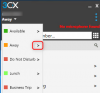
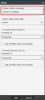
If you are using the 3CX client for windows then you can simply expand the Status Drop down menu and click on the arrow next to a Status. This will take you to a new options page that you can type your personal message.
2018-06-12_09h45_33.png

2018-06-12_09h46_17.png

In the Web client you can again expand the status drop down menu on the top right and click on the message bubble icon.
 
Thanks a lot for the screenshots, @YiannisH_3CX.

And how/where do the other users see the custom status message? Could you perhaps provide a screenshot of that too?

And last but not least: Can the "custom status message" also be set in the Mac OS App as well as in the iOS App for iPhone?
 
And how/where do the other users see the custom status message? Could you perhaps provide a screenshot of that too?
That depends on where the users are using to see the presence information from. On the 3CX windows client you can hover over the persons name and the status along with the custom message will appear.
On the Web client the message will appear under the name of the extension as there is more room to display things.
On the Android client it will again appear under the extensions name under the presence screen.

The option is also available on iOS and MacOS
 
Okay thanks @YiannisH_3CX, does "it will again appear under the extensions name under the presence screen" mean that the custom status message will actually be shown on the Yealink device when running Android?

Is there any way to see it on a screenshot for illustrative reasons? We were actually tending to purchase several Yealink models T48G running Linux but if the T56A running Android actually allows all users to see the custom status message on the desk phone device, we will likely go with the T56A model instead.

Thanks for anyone who can provide an insight with a screenshot for those who are pre-sale and cannot try it out themselves (yet)... but still want to make the right purchase decision.
 
Please note that what ever i have mentioned in my previous replies only applies for 3CX clients. IP phones cannot show presence information.
 
Does that mean IP phones like Yealink T48G and T56A can also not show the default status like "Busy", "Away"? Or only the custom status messages not?
 
Does that mean IP phones like Yealink T48G and T56A can also not show the default status like "Busy", "Away"? Or only the custom status messages not?

As posted in the previous message by YiannisH_3CX, the phones will not display the status or custom message on the display.

This info will only show in 3CX client and 3CX web client.
 
Ok noted, that's a pity. I guess I anyway have to stick with Innovaphone for the time-being as there both status and custom message are shown on the phone display.
 
Innovaphone uses self-branded devices if I recall?
 
Yes, and if a user sets a custom status message on the client or changes his status, it is automatically shown on all desk phones. That helps a lot and is a key feature for us in the IP phone world.
 
You can post this a feature request on https://www.3cx.com/community/forums/3cx-ideas/ . All posts are reviewed by their corresponding Departments and, if feasible and voted for by other users as well, may be implemented in an upcoming service pack or update.
 
Status
Not open for further replies.

Latest Posts

Forum statistics

Threads
111,885
Messages
589,547
Members
164,745
Latest member
Herm77