phone voice breaking issue on FTTH connection

Status
Not open for further replies.
Yes - local calls between phones on the same LAN and SBC will keep the traffic local ( it will not not pass through the PBX or the internet).

Make sure that your extensions do not have "PBX Delivers Audio" enabled or Recordings.
 
Hi John,
I still need your help, after SBC installation every day I receive 2/3 e-mail like below:

Trunk SBC 'teagroup' (194.153.196.225/10.1.1.167) has changed status to Up
Trunk SBC 'teagroup' (194.153.196.225/10.1.1.101) has changed status to Up

Is it normal ?
thanks
S.
 
Is your SBC local IP changing from 10.1.1.167 to 10.1.1.101 or do you have two SBCs at the same place?
 
I believe to have one SBC. It's installed on local pc with the ip 10.1.1.157.
 
If the IP is changing you will have issues, the phones will not be registering.

But do you actually have problems or were you just asking if the emails are normal?
 
I restarted the SBC computer and I received this mail:
Trunk SBC 'teagroup' (194.153.196.225/10.1.1.157) has changed status to Up
Thanks
 
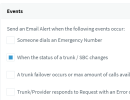
This is absolutely normal, every time the SBC reconnects to 3CX you will get this email.

It's because you have this enabled it your email notifications:
1663152677698.png


If you are not facing any problems, you can simply ignore it or even disable this notification
 
If the IP is changing you will have issues, the phones will not be registering.

But do you actually have problems or were you just asking if the emails are normal?
Both
I 'm going to remove the SBC from a client and install on a virtual internal server, can I do it? Ho can remove SBC form client?
 
To move it, you must uninstall the SBC from the computer you had it on.

The problem is that that IP is changing in this case, the virtual server will also face the same issue if you don't make sure the machine that has the SBC gets a static IP (or DHCP reservation).
 
To move it, you must uninstall the SBC from the computer you had it on.

The problem is that that IP is changing in this case, the virtual server will also face the same issue if you don't make sure the machine that has the SBC gets a static IP (or DHCP reservation).
grazie!
 
I have available a windows server 2008 on citrix but I’ll consider your suggestion.

Thanks a lot
S.
 
Some useful advice / warnings: Server 2008 is very old, probably the TLS will fail, and we have never tested our SBC to work on it.

Please make sure you are using a supported 3CX OS like:
  • Windows 10 (Pro, Enterprise)
  • Windows Server 2016 (Standard, Datacenter)
  • Windows Server 2019 (Standard, Datacenter)
 
Hi John,
you were right, there were 2 PC with SBC installed !
Now I uninstalled the SBC and left only one instance on IP 10.1.1.157 but the message are still present.
Could the cause be the provider WAN network issue or OVH server issue ?
Thanks
S.
 

Attachments

  • Screenshot 2022-10-10 101257.png
    Screenshot 2022-10-10 101257.png
    18.9 KB · Views: 3
  • Like
Reactions: JohnS_3CX
Do you actually face any issues now or are you simply noticing the messages?
 
it seems only a message but I can not be sure due to the intermittent frequency and time.
thx
S.
 
If it's just a message you can ignore it.

If problems persist with voice / calls dropping, you will have to investigate for packet loss.
 
  • Like
Reactions: AWS2P
Fine, Thank you.
Can you suggest me some tools to investigate breaking voice internal to external the appear only on desk phone (on on windows cliente app) after 30 sec of conversation and without SBC.
The internet provider is not providing a good support.
It is not so urgent but I 'd like to find the root cause.
Grazie
Simone
 
The main tool I can suggest is Wireshark, but that won't tell you anything on its own if you don't know what you are looking for.

It might be easier to put in a second provider for a month, and run your stuff from their connection to compare :p
 
Status
Not open for further replies.

Members Online Now

Forum statistics

Threads
111,832
Messages
589,283
Members
164,662
Latest member
DejanMDS