• We do not provide troubleshooting help for unsupported phones. Please try with a supported phone.
  • V20 Update 10 Alpha 2 Learn more

Solved Phones are being messed up and can not be firmware updated anymore

Status
Not open for further replies.

GVB

Free User
Joined
Sep 8, 2017
Messages
67
Reaction score
4
Hello,

I have a weird phenomena here with 3CX.

All our Fanvil phones turned red because they didn't match the required firmware anymore.

After (attempting to) updating them all I have several devices that remain red.

Trying several times but no change.

Then I spotted that all the phones that won't update suddenly have a MAC address with a : in it while others don't.
When I look at the provisioning tab of these phone all of them suddenly became CyberData Emergency Intercom devices?

Can anyone tell me what's going on here and how I can fix this?

On another 3CX pbx I also have 3 new phones that suddenly appear 3 times in the phones list aswell for some bizar reason. I don't know if this is problematic?
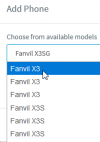
 
On another 3CX pbx I also have 3 new phones that suddenly appear 3 times in the phones list aswell for some bizar reason. I don't know if this is problematic?

I just noticed that when I want to add a new fanvil phone in the extention page that all fanvil phone types appear 3 times in the selection list aswell maybe that's the cause of the multi appearing in the phones overview?
 

Attachments

  • multiple_phones.png
    multiple_phones.png
    5.3 KB · Views: 3
  • 3CX Version: latest 16.0.8.9
  • Server OS: Windows 2019 Standar
  • Is the 3CX Server Hosted and where: no, running local
  • IP Phone Make/Model/Firmware: Fanvil X3SG 3CX 2.10.1.6836
  • Provisioning Method: Local
  • Are custom Phone Templates being used: NO
 
Hi @GVB

Have you tried unplugging the phone for a few minutes then reconnecting it?
 
Vasilis,

is this for the tripple appearing phones or those that won't update?
 
I also see that I can't remote reboot those 'red' phones, can't login to UI etc... all options are greyed out.

So I can't see what the UI password is either which means I'll have to manually reset them when being in front of it.
 
hi @GVB,

For the firmware issue:

1. Double check if there aren't any custom templates being used, and if there are delete them.
2. Go to each extension and remove all the phones from the extensions even ones that might show up as Cyberdata Intercoms. You should have zero phones on each extension.
3. Factory reset the phones.
4. Reprovision the phones via PNP from the Phones page.
5. Now try to update the firmware.
 
I got till step 4 but it won't show up in 3CX (yet).

I will try again on Monday and put the phone on my desk (subnet .0.x) as it is now in subnet .40.x.
I can reach it from my desk and the 3CX server tho but it might appear from a broadcast request when I put it here.

I'll give more info about the progress on Monday.

Enjoy your weekend.
 
ok, that phone showed up when put in my own network range.

I fixed a few others aswell but the question remains why they became the wrong model and MAC with colons ( : )

anyway here's the procedure I follow

1. under Phones take note of extention Number of the problematic phone

2. take note of IP address

3. copy mac address

4. remove non-3CX APP phones from extention.

5. double check by re-opening the extention that they are all gone exept the 3CX APP.

6. add a Fanvil 3XS(G) phone to know the UI password again

7. set language, date format and copy UI password

8. login to the phone with admin and copied password

9. go to Configurations tab

[x] Reset ETC file
[x] Clear Contact
[x] Clear Call Records

click [Reset]

after a few minutes...

10. go to phones and tick the checkbox of the 'new' phone and assign it to the extention from step 1 and press OK

if it keeps showing as new phone after a few minutes assign it again to the extention
and then it will go on just fine.

11. tick the phone again and select [+ Firmware] to update it.

it will now show up as a new phone again for a while till the phone passes the firmware update and connects to 3CX again.
 
Hi @GVB,

Glad to hear that you've managed to resolve the issue you encountered. I can't say why this happened for sure, it's quite abnormal behaviour. If this happens again, I'd suggest contacting a 3CX Partner or Support to investigate further.
 
it's ok, only 2 left...

and the procedure is shorter than above. the culprit seems to be that mac address with : in it.

this works too...


1. under Phones take note of extention Number of the problematic phone

2. copy mac address

3. remove non-3CX APP phones from extention.

4. double check by re-opening the extention that they are all gone exept the 3CX APP.

5. add a Fanvil 3XS(G) phone

6. set language, date format

7. go to phones and tick the checkbox of the extention noted in step 1 and press [+ Firmware] to update it.

after a few minutes it's all ok again
 
Status
Not open for further replies.

Forum statistics

Threads
112,147
Messages
590,959
Members
165,167
Latest member
Finatra.us