- Joined
- Mar 14, 2022
- Messages
- 24
- Reaction score
- 5
I have 5 different schools attached to one Hosted system. I need to segregate the call pick up so only users in certain groups can pick up calls when dialling *20*.
For instance I only want members of group 901 to pick up calls from other members of 901.
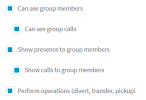
I also want to restrict some phones from picking up calls when dialling *20*. I set up a user group without ticking the Perform operations (divert, transfer, pickup) expecting that this will stop the member of the group from picking up calls from other users not in the group, however it doesn’t work.
Could you explain how I can achieve both options?
For instance I only want members of group 901 to pick up calls from other members of 901.
I also want to restrict some phones from picking up calls when dialling *20*. I set up a user group without ticking the Perform operations (divert, transfer, pickup) expecting that this will stop the member of the group from picking up calls from other users not in the group, however it doesn’t work.
Could you explain how I can achieve both options?