Plug’n’Play Provision

Status
Not open for further replies.

jcostlow

Gold Partner
Advanced Certified
Joined
Jul 11, 2020
Messages
396
Reaction score
152
I have noticed lately that provisioning our Snom phones via Plug’n’Play isn't working. The phone shows in bold and as new on the phone tab, you select it and choose assign extension, set all parameters and hit ok but the phone is never provisioned. I end up copying the provisioning URL and pasting it into the phone manually then rebooting and the phone provisions.

I have had this happen to 2 different PBXs with 2 different models. First occurrence was a customer running hosted by 3CX with a Windows SBC and Snom D735 on firmware 10.1.84.15

Tonight I had it happen to a customer who runs on premise (linux VM), Snom D785 running 10.1.84.15

I will try to run a capture to see what is happening but figured I would post and see if anyone else is having this issue.
 
Hi @jcostlow

Whenever this happens, the first thing you should check on Snom phones is the time and date.

If they did not manage to speak with an NTP server and get their date and time correct, PnP provisioning will fail.
 
I will check and see next time it happens if the time is correct. I had to setup another phone today on one of those PBXs and the phone was able to provision as expected and time was correct for default time zone.
 
By default the phone will have a date of 1970 in case the NTP service fails.
That's how you can confirm it.

When the NTP is successful, the hour might not be correct because it uses it's default timezone, but the date and minutes will be correct. This phone should provision as expected.
 
This came up today as I am working on setting up a new phone system for a customer and the phone shows up on the phone tab but doesn't provision after choosing all the settings.

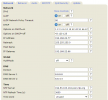
It comes up with the time having the correct minutes but hours is for a different time zone. When looking at the web UI is shows time zone unused.

Setting the time zone and rebooting doesn't pull correct time but if I change to just pool.ntp.org and reboot it get the time and can be provisioned via PNP. I will see about making a ticket with Snom because both NTP servers listed are default from factory and it probably should have a time zone chosen even if it is wrong.
1656364124716.png
 
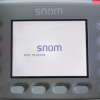
The phone probably finds a local NTP server on your network (which may be running on a switch or router) and tries to use that instead of the default pool. You can actually see it on the bootup screen, it will say what NTP it found:
1656401724939.png

If this is on the LAN, you can go find what device is acting as the NTP server and correct the time. The snom phones should then have correct time after reset.
 
I took the phones onsite and finished setup today, the new phones showed 192.53.103.104 pool.ntp.org during boot.

Some showed up and provisioned as expected. On the others I went to put the config server path in manually. I have an open ticket with Snom for phones randomly showing the date as 2036 so I will ask them about this as well.
 
I have an open ticket with Snom for phones randomly showing the date as 2036 so I will ask them about this as well.
Yes, this would cause provisioning failures since many of the onboard certificates will have expired if the date is 2036, breaking TLS.

If you search for NTP 2036 you will find a lot of information online, I speculate that the ntp client package might need to be updated on the snoms to prevent this..
 
So far for my 2036 issue they have had me testing a new firmware revision (v 10.1.119.10) and I haven't had a phone revert back. Maybe onto something with this firmware release.
 
Status
Not open for further replies.

Members Online Now

Forum statistics

Threads
111,832
Messages
589,283
Members
164,662
Latest member
DejanMDS