Solved prepending/appending Name/DID to CallerID

Status
Not open for further replies.

David Schumann

Silver Partner
Joined
Mar 27, 2019
Messages
50
Reaction score
7
Hello,
We have a customer who has multiple offices and a set of phone numbers at each. The main telephony traffic is managed by one queue. One number from each of the offices leads to the central queue and is answered by a group of agents.
Currently, incoming calls show up as "queueName:callerID". Seeing multiple numbers all ring at the same queue, it would be good to see which of the offices was called. I would like to be able to calls to this queue to be labeled as "inboundRule:callerID". This would allow me to name the inbound rules based upon their location. That way the Agents would see which location the client had dialled.
The Alternative would be to set up a call queue for each of the numbers. However, I feel makes this is overkill and makes managing the queues more difficult for the agents. Also, it creates more possibilities for human error.

How would you solve this? Is there a built-in solution which I am missing?
Thanks in advance for any help.
 
The Inbound Rule name actually does get prepended/appended to the Caller Name. When receiving a call to a Call Queue while having the names prepended, you should be seeing: QueueName:InboundRuleName:CallerID

Is this not the case?
 
Hello,
Thanks for the fast reply. No, As far as I can see it is not working that way. I just did a test call.
The formatting in the Web Client is as follows: callerID:queueName
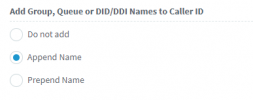
These are the settings I have in the addressbook options:
1618232931261.png
 
Last edited:
In that case you should be seeing callerID:InboundRule:queueName

Is there any chance the DID/CID rule routing being matched has no name assigned to it? Check under Inbound Rules >> Edit. If not, it might be that the call is actually not matching that DID/CID rule but instead is following the routing on the SIP Trunk level.
 
So I went ahead and removed the inbound rule, set the forwarding settings for the sip accountto end the call and then recreated the inbound rule. The inbound rule has a name and is set to forward calls to the queue.
I apply those settings and do a test call. The result remains the same. callerID:queueName
I return to the settings of the sip account. The forwarding rules have automatically been set to be the same as the inbound rule.
 
I continued testing...
I thought it may have something to do with the fact that the test account was a SIP account, not a trunk. So I tried it with a did that wasn't the main number in a trunk. The behaviour is the same: callerID:queueName
 
I may have misunderstood the situation. What do you mean exactly by "SIP account, not a trunk" is this not configured under SIP Trunks in the Management Console?

Do you have more than one SIP Trunks configured on this 3CX Instance? If no, try setting a different routing for the SIP Trunk (SIP Trunk >> Edit >> Route calls to) and a different routing for the DID/CID Rule. Which one gets followed when you make a call?
 
As far as I understand it a sip account is for a single MSN (one numer). A SIP Trunk is a simmilar group of numers (base numer + extensions)
I have multiple trunks registered as well as a couple MSNs.
I have created an inbound rule for a DID which differs from the Main Trunk No. Lets say the forwarding rule in general SIP Trunk settings should forward the call to queue A. The Rules defined for the specific DID should forward the call to queue B. The call is forwarded to queue A. I do not understand why. I presume this is part of my problem
 
habe die Ursache gefunden.
Die DIDs waren im SIP Trunk mit +49######## hinterlegt. Ich habe sie entfernt und in folgendem Format hinzugefügt: 0########
Danach wurde die Inbound rule erkannt.

Vielen Dank für die Hilfe.
 
  • Like
Reactions: ChrisC_3CX
That makes sense since SIP Trunk/Account name will not get prepended/appended to the Caller name as the DID/CID Rule name would be.

In any case, glad to hear you managed to resolve the issue!
 
Just do add to this in case someone else has similar problems in future.
The format in which the DIDs have to be entered in the SIP account settings vary between providers. I have three different providers registered to this PBX. All want the DID notation different. Some want +4912345678, others 4912345678 and others again want 012345678.
I figured out which provider wanted what formatting by running a wireshark scan and calling a number for each of the trunks. Then I checked what the formatting was for the inbound call and applied that formatting to all the DIDs for that provider.

Hope that helps someone if they should have problems in future.
Kind regards,
David
 
  • Like
Reactions: ChrisC_3CX
Do note that alternatively you could also use the asterisk symbol as a wild card in case you are unsure of the format sent by the provider. For instance you could catch all calls to either of the below DIDs:

+4912345678
4912345678
012345678

by using *123456789 as a DID on the sIP Trunk level. Do make sure that you use at least 6 digits plus the asterisk so a total of 7 characters.
 
  • Like
Reactions: leejor
Status
Not open for further replies.

Forum statistics

Threads
111,974
Messages
590,081
Members
164,899
Latest member
mazet