Solved Problem with email sending

Status
Not open for further replies.

mlombard

Free User
Joined
Jan 7, 2021
Messages
5
Reaction score
0
Hello,

I am try set up a 3CX Phone System on a Debian server, but I have a problem with email sending. I use the one year free version, so I can only use the 3CX SMTP server.
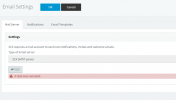
My problem is that no email are sent from my server, when I click on the test button in the "Emails settings" menu, I get the error "A task was cancelled".

Any ideas about that problem ?

My 3CX version is 16.0.1078.

Thanks in advance
 
Are you blocking outbound port 2528, which is the port used by 3cx smtp

Does the IP address under Settings - network - static public IP match your wan IP address (if static ip configured)

Under Settings - Email Settings - Notifications , have you configured 'email address for notfications'
 
Thank you for your quick reply.
The outbound port 2528 is openned, my system administrator can see the requests from my server going out from that port.
The public IP address is correct in the settings.
The email address for notifications is configured. I tried different email address but no success.
 
Is your maintenance valid? Go to Settings / License and press the "Refresh License Key Information" button and see if you get any errors there.
 
I get no errors when refreshing the license key information.
Is there any log files where I can see more info about the error ?
 
You should get more details by looking in the management console log. You can download the log by navigating to Dashboard / Activity log / Logs / Instance. Enabling verbose logging will help capture more details. You can enable verbose logging from Dashboard / Activity log / Settings.
Restart all services to apply the change and try sending another Test email to log the error in detail. Also send us a screenshot of the error so we can see it.
 
Thanks for your help.

I have activated the verbose log. I don't have any log error when hitting the test mail button. However, I am having log errors when trying to send the welcome message (log attached).

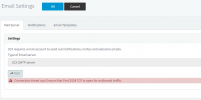
I have seen one detail, after rebooting the services, the first time I test the mail sending (in settings) I get an other error at the screen :

EmailTestError1.png

The next errors are the one I told you at first :

EmailTestError2.png


Looks like my port 2528 is still blocked ...
 

Attachments

Last edited:
Looks like I my port 2528 is still blocked ...
That is the first thing i would check. Make sure that traffic is allowed before anything else.
The message "A task was cancelled" is probably caused because the first message is still in queue.
 
Problem solved. My system administrator miss configured the firewall at the first time.
Now the port 2528 is well oppened and it is working perfectly.

Thank you for your help.
 
Glad I could assist and see that the issue has been resolved.
 
Status
Not open for further replies.

Forum statistics

Threads
111,974
Messages
590,081
Members
164,899
Latest member
mazet