Problem with receiving calls via SIP trunk - SIP 600 Busy everywhere

Status
Not open for further replies.

SHogun LLC

Free User
Joined
May 25, 2022
Messages
9
Reaction score
1
Hi all!
We have a problem with receiving calls via SIP trunk
We use a Standard license (free)
A week ago, we updated the PBX from the 16th version to the 18th.
We have 1 trunk with 3 voice channels.
Registration by IP address.
Sometimes, when an incoming call, the subscriber hears a message from his operator that the number is not in serviced.

The same message can be heard if the incoming call is not directed anywhere - do not do DID.

But our incoming calls fall on:
1. Voice menu.
2. Then to a group of calls.
3. Then, if there is no response, to voicemail.

If there are more than 3 incoming calls - the subscriber receives a busy signal from our operator.

But the problem is that sometimes the subscriber hears a message that the number is not serviced.

That is, it seems that the PBX cannot route the incoming call and gives a rebound to the line.

The problem is not permanent.
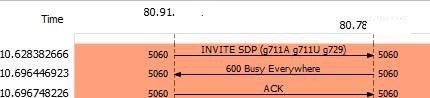
The operator sent a dump in which it is clear that our PBX gives him a signal SIP 600 Busy everywhere (apparently this message is perceived as unavailability of the number).

He asks to reconfigure our PBX so that it sends SIP 486 Busy Here
Is there any way to reconfigure this behavior of the PBX to send a 486 Busy Here message?

Apparently, at some point we reach the limits on the number of calls (just it is not clear on what, on the trunk, on the IVR on the incoming group).
Where and how to see it?
 

Attachments

  • sip.jpg
    sip.jpg
    15.2 KB · Views: 9
Hi @SHogun LLC

The 600 Busy Everywhere error is sent on 2 occasions.

1. When the simultaneous calls limit of the trunk is reached.
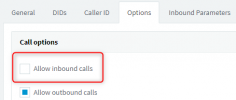
2. When the option "Allow Inbound calls" is unchecked in the trunk
1653464443415.png

In both scenarios there is no way to change the error sent.
If however you are reaching the trunk sim calls then try to increase the number of sim calls in the trunk so the provider is the one who cuts the calls first and they never reach the PBX to be rejected.
 
Hi @SHogun LLC

The 600 Busy Everywhere error is sent on 2 occasions.

1. When the simultaneous calls limit of the trunk is reached.
2. When the option "Allow Inbound calls" is unchecked in the trunk
View attachment 30320

In both scenarios there is no way to change the error sent.
If however you are reaching the trunk sim calls then try to increase the number of sim calls in the trunk so the provider is the one who cuts the calls first and they never reach the PBX to be rejected.

Then I don't understand how the restriction works and how to monitor it.
Now I tried to "overload" the trunk.
I called from 3 phones and got a normal busy signal.
And a letter about exceeding the limit on the trunk.

That is, the PBX handles this situation normally.

All trunks are allowed to receive external calls.

I also received a 600 Busy Everywhere signal in ouside office hours, when there was no one in the office.
Moreover, if you call back, then from 3-4 times you can hear the voice menu signal.
 
And a letter about exceeding the limit on the trunk.

You need to speak to your provider, as it appears you have gone over your limit placed on your sip trunk.
 
You need to speak to your provider, as it appears you have gone over your limit placed on your sip trunk.
But when I get a 600 error, I don't have any reports of exceeding the trunk limit.
If I actually exceed the number of lines in the trunk, I hear a busy signal.
 
How many simultaneous calls does your license allow? Could you be hitting that before you hit the trunks max simultaneous calls?
Internal calls also count towards the license limit.
 
Now we have 4 simcalls
According to my 16th version, there were 8 of them. I suspect that after upgrading from version 16 to version 18, the number decreased.
I'll try to go back to version 16.
 
I'll try to go back to version 16.
You won't be able to activate your key on V16 anymore so I would not recommend attempting to do so.
Also you cannot restore a V18 backup to V16.

You have a 4SC PBX you have a free key. Even you if you can install V16 and activate your key you will still have 4SC as all free keys now are 4SC.

Regarding your issue you will need to isolate in which scenarios the PBX sends 600 Busy Everywhere to the provider and monitor the simultaneous calls of the PBX when that happens. You may even need to keep a capture running using tshark to catch the issue.
 
  • Like
Reactions: Evolute IT
I have a backup from V16 but I can't restore it since I have an old 16th version distribution.
We upgraded to 18 because there was a message that mobile clients would not work.

About the reduction of sim calls is of course an unpleasant joke on the part of 3cx...

The operator sent the tshark dump
This is not a trunk loading problem.
It is very likely that the SIP 600 error occurs when there are also internal calls at this point.
That is, the restriction on the number of commutations in general, of which there are now only 4.

But can we get the free version of v18 standart dedicated for 8 sim?
Yes, you will have to reconfigure everything again, but this is not a problem
 
Last edited:
The free version of the PBX currently has 4 simultaneous calls. You can of course upgrade to 8 simultaneous calls if you want.
Here is the pricelist.
 
  • Like
Reactions: Evolute IT
About the reduction of sim calls is of course an unpleasant joke on the part of 3cx...
You use free stuff and you have agreed to the software's terms and conditions.

Free = they can change it if they want. Consider yourself lucky to still have a free option.

Therefore, the fact that Free SC was reduced isn't a "joke" but a business decision that actually make sense.

If you want free always, there are other free PBX options.
 
The free version of the PBX currently has 4 simultaneous calls. You can of course upgrade to 8 simultaneous calls if you want.
Here is the pricelist
The most frustrating thing for me is that the limit of sim calls of the PBX works out exactly like this - SIP error 600.

There are no notifications (neither in the event log nor in e-mail).
That is, there are no notifications.

I don't know that we have reached the sim limit, no one knows that we have reached the limit.

If an internal abonent calls and hears a busy signal - he will dial again.
If they call from the city - they hear a message that "the number is not serviced". And they conclude that the company has closed.

We can buy a license for 8 sim calls.
I think this can still be done in Ukraine.

What if that's not enough?
How do I find out?
I don't have anything to go to the boss with and say: guys, i need more money.
I have no reason.

How to make the PBX respond with a SIP 486 Busy Here error at least in the trunk?
And somehow inform the administrator that the limit has been reached.
 
Last edited:
You use free stuff and you have agreed to the software's terms and conditions.

Free = they can change it if they want. Consider yourself lucky to still have a free option.

Therefore, the fact that Free SC was reduced isn't a "joke" but a business decision that actually make sense.

If you want free always, there are other free PBX options.
The company can do whatever it wants. Can completely abandon the free version, can make a trial version.
That's her right.

But guys, how do you know if there aren't enough licenses?

How do I prove to my boss that I need money for licenses?

Make a normal notification and all this will solve all the issues.
It will be easier for me to prove that the free version or the purchased quantity is not enough for us.
And the company will get a new customer.

It's simple.
Now you're just pushing new customers away from you.
 
The company can do whatever it wants. Can completely abandon the free version, can make a trial version.
That's her right.

But guys, how do you know if there aren't enough licenses?

How do I prove to my boss that I need money for licenses?

Make a normal notification and all this will solve all the issues.
It will be easier for me to prove that the free version or the purchased quantity is not enough for us.
And the company will get a new customer.

It's simple.
Now you're just pushing new customers away from you.
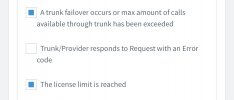
Under Console > Settings > Email > Notifications:

E5E47331-C53B-40B5-BD82-9323474D2781.jpeg

This way you get an email whenever the 3CX license limit OR a trunk limit (set in the SIP Trunks > the trunk > Max Simultaneous Calls) is reached.

As for your provider side, it's up to them to provide notifications if you exceed the channels/lines you have. Some allow bursting so that overflow is billed by the minute, but some will outright reject the call.

Now, for the "Number is not in service.", that would be an issue to take up with your provider. They might have bad routes in their infrastructure. I've seen that before.
 
  • Like
Reactions: YiannisH_3CX
Thank you!

All settings as on the printscreen.
The operator reports that the trunk limit is exceeded.

I'm increasingly inclined to think that this is a problem with the provider's routes.

I decided to check everything myself again.
I put Wireshark on a server with a PBX and asked to record a trace log on our router.
 
  • Like
Reactions: YiannisH_3CX
Status
Not open for further replies.

Forum statistics

Threads
112,325
Messages
591,898
Members
165,479
Latest member
Senergia