Solved Probleme bei der Aktivierung des Windowsclient

Status
Not open for further replies.

Christof Lemke

Trainee Partner
Intermediate Cert.
Joined
Apr 1, 2021
Messages
8
Reaction score
3
Ich habe für unseren Kunden den Windowsclient installiert.
Nach der Anmeldung mit der Konfigurationsdatei, ist es weder möglich, die eingerichteten Nebenstellen zu sehen, noch kann man den Status verändern.
Die Anzeige rechts (Bereit für Anrufe) wird nicht grün, wie gewöhnlich. Sondern sie bleibt weiß. Woran kann das liegen?
Installiere ich den Android Client ist es genau dasselbe!

Danke für Hinweise hierzu.

MfG

Chris
 
Hi @Christof Lemke,

Can you send a screenshot of what you're seeing? You've added the extension, you've logged in to the WebClient now but it does not register?
 
Hi Vasilis,

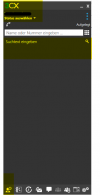
Thanks for reaching out to me so fast. I´ll send you a screenshot so you can see what I mean. 1625658557884.png
As you can see, the extension is added. I marked the name of our customer black for data security reasons.
The first icon, yellow highlighted, should show me the other extensions in the company. It´s completely empty. I can´t change the status.
 
Hi @Christof Lemke,

Is this computer you're trying to connect to the PBX with, on the same LAN as PBX or not?

If not on the same LAN, have you opened the ports?

Can you also PM me your license key (not post it here)?
 
Hi @Christof Lemke,

From the PC within the LAN, are you able to access the PBX on port 5001 using either the FQDN or the internal IP?
 
Hi Vasilis,

I configured the PBX with Port 443, instead of 5001 and that works well.

Send you in our convo a screenshot ( not here! )
 
  • Like
Reactions: VasilisV_3CX
Hi @Christof Lemke,

After our private conversation you updated me and told me that you got it working now after changing the ports. If you run into any issues, feel free to let me know.
 
Status
Not open for further replies.

Forum statistics

Threads
112,025
Messages
590,368
Members
164,978
Latest member
FringeIT-Eric