PROBLEMS WITH CALLS ON Samsung Galaxy Tab S10 FE TABLET

alfredo42

Premier Customer
Joined
Apr 24, 2026
Messages
4
Reaction score
0
We have encountered difficulties in making calls through the app on a Samsung Galaxy Tab S10 FE tablet, while the chat function works properly. On older Samsung tablets, we have never experienced such problems, for example on the Galaxy Tab Active 2 and similar models. Do you have any ideas about why the call function is not working?
 
Hello can you define your problem a little more as it's vague.

also, app version, OS version.
 
  • Like
Reactions: paulodagraca
  • 3cx version is 20, update 8.0 Build 1109 Beta
  • OS version on adroid is 16
  • app version on android is 5.5 build 20 20.6.0.20
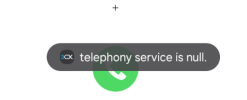
On the attached file you can see the error. It seems like this "telephone service" is missing
 

Attachments

  • Screenshot 2026-04-24 133346.png
    Screenshot 2026-04-24 133346.png
    28.3 KB · Views: 9
  • 3cx version is 20, update 8.0 Build 1109 Beta
  • OS version on adroid is 16
  • app version on android is 5.5 build 20 20.6.0.20
On the attached file you can see the error. It seems like this "telephone service" is missing
Hi @alfredo42 the application is trying to access the "Telephony" functions, but the system is responding that the service doesn't exist or isn't currently available.

is this tablet a Wi-Fi-only model that doesn't have a built-in cellular chip?

Please check the 3CX permissions and make sure it has access phone or call management.
  • Go to Settings > Apps.
  • Find the 3CX app.
  • Go to Permissions.
  • Validate that "Phone" and "Microphone" are set to "Always allow".
In the same Settings > Apps menu, look for the "Choose default apps" option. Check if there's a "Phone app" option and make sure the setting isn't conflicting with 3CX.

Finally, try turning Airplane Mode on and off and restart the tablet.
 
Is the Telephony" functions mandatory for 3cx? Can't it work like whatsapp making call only based on the network?
 
Alfredo, please enabled it and let us know it is ok.

Thanks!
 
The tablet is wifi only, so there's not an option called "Phone app", maybe, the telephony functions are not avaiable on this tablet. So is the "telephony functions" mandatory for 3cx? Why can't work without it?
 
Hi @alfredo42

Can you check if Telecom API is enabled and let us know?
- Open hamburger menu (Top Left corner)
- Tap on Settings
- Advanced
- First option at the top

Please can you send us verbose logs whilst reproducing the app for both cases of Telecom ON and Off?
- Open hamburger menu (Top Left corner)
- Tap on Settings
- Advanced
- Scroll all the way down and enable verbose logs

Reproduce the issue whilst Telecom is ON
Reproduce the issue whilst Telecom is OFF
;and send us logs

- Open hamburger menu (Top Left corner)
- Tap on Settings
- Advanced
- Scroll all the way down and tap on Send log report

Share this to me via personal message as a shareable link
 

Forum statistics

Threads
111,873
Messages
589,500
Members
164,719
Latest member
David Gharakhanian