Properly securing your router/firewall with UDM PRO (need help please)

Status
Not open for further replies.

Hgesser

Free User
Joined
Jan 15, 2021
Messages
8
Reaction score
0
Hello, sorry for the very newbie question here.

I just started with unifi, an UDM PRO. I am trying to setup port 5060 to only be allowed to provider public IP, but I am having difficulties in figure out how to do this with UDM.

Could you please give me a hand?

What else do you recommend I do with the UDM, in regards of ports or any other recommendations? I am loving the unifi and the 3CX but this is a different beast to what I am used to and am afraid I wont be securing the 3CX properly.

Thank you SOOOOO very much!!!
 
As this is a UDM question, you would be better off asking in the Ubiquiti forums.
 
I tried, but it seems like no one in the forum is using UDM pro with 3cx... :( Thanks though, I truly appreciate your reply and I will keep trying. I did do a few things in my UDM, but I honestly don't know if I have properly protected it. I was hoping someone here would know better.
 
But this has nothing to do with 3CX. If you had ANY SIP provider and ANY PBX behind it it would be the exact same steps.
 
Understood. This is my first time trying 3CX, or anything like it, I am really a newbie, trying to save money since our business is closed due to the pandemic and we need to cut expenses. I thought these forums would be the perfect place to find help. I got everything working, everything. Now I just wanted to make sure that the system is secure.

Forgive me, I didn't know where to look for help, still don't know. Clearly this isn't the right place to ask for help.

Thanks again and have a great week.
 
3CX out of the box is already secure. Doing what you are trying to do is 'extra' that is not needed unless you are especially paranoid or have some compliance requirement. As long as you stick to the 3CX defaults with complex passwords, disabling remote extensions, restricted country blocking, etc you should be fine.
 
  • Like
Reactions: YiannisH_3CX
Thanks for that. That is what I have been reading. BUT I am having a lot of attacks on port 5060 and a couple others... which alerted me to look for help. Thanks!!
 
You are not getting specific attacks. Those automated scans were happening before you even heard about 3CX even if you move 3CX to the cloud they will still be scanning the default SIP port. Nothing to be concerned about. Keep 3CX current, keep with the defaults, turn on the global blacklist and ignore the messages.
 
  • Like
Reactions: FridayIT
As far as restricting traffic, this isn't 3CX specific, nor is it even VoIP specific. The same method for restricting traffic applies to any incoming traffic to any port/service. Which is why I recommended the Ubiquiti forums. And in your case, if this is for your business, then I don't see why you wouldn't take advantage of the free 3CX hosting and then you wouldn't have to worry about any of this.

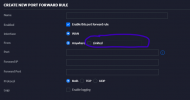
But in your case, assuming you created a port forward for the SIP traffic, it would make sense to fill out the field that says 'Limited':

1611017877428.png
 
  • Like
Reactions: Hgesser
As @cobaltit mentioned this is probably a question for the Unifi forums as we are talking about specific configuration for the UDM Pro.
I am sure there are plenty of online resources and YouTube videos explaining how to do this so all you need to know are the 3CX ports which you can find here: https://www.3cx.com/docs/ports/ so you can forward the correct ones and the IP(s) of your provider.
Also make sure that you do not have any remote phones configured via STUN as those will stop working once you limit 5060 to your providers IP.

What i would recommend is to port forward all the necessary ports and then run the 3CX firewall checker to make sure everything is configured correctly. That will give you a fallback point in case something wrong. Then limit port 5060 and check that you can still make calls and everything is still working. If something goes wrong then you can return to the working config.
 
  • Love
Reactions: Hgesser
You are not getting specific attacks. Those automated scans were happening before you even heard about 3CX even if you move 3CX to the cloud they will still be scanning the default SIP port. Nothing to be concerned about. Keep 3CX current, keep with the defaults, turn on the global blacklist and ignore the messages.
I would agree with you if all other ports were having the same issue. But over 500 in a day, for that port alone?
 
As far as restricting traffic, this isn't 3CX specific, nor is it even VoIP specific. The same method for restricting traffic applies to any incoming traffic to any port/service. Which is why I recommended the Ubiquiti forums. And in your case, if this is for your business, then I don't see why you wouldn't take advantage of the free 3CX hosting and then you wouldn't have to worry about any of this.

But in your case, assuming you created a port forward for the SIP traffic, it would make sense to fill out the field that says 'Limited':

View attachment 20193
Thank, you. This is what I thought. But this allows for just ONE IP only. My provider uses 2 IPs.

I guess I will have to use only one of their IPs and cross my fingers it works! Thank you.
 
As @cobaltit mentioned this is probably a question for the Unifi forums as we are talking about specific configuration for the UDM Pro.
I am sure there are plenty of online resources and YouTube videos explaining how to do this so all you need to know are the 3CX ports which you can find here: https://www.3cx.com/docs/ports/ so you can forward the correct ones and the IP(s) of your provider.
Also make sure that you do not have any remote phones configured via STUN as those will stop working once you limit 5060 to your providers IP.

What i would recommend is to port forward all the necessary ports and then run the 3CX firewall checker to make sure everything is configured correctly. That will give you a fallback point in case something wrong. Then limit port 5060 and check that you can still make calls and everything is still working. If something goes wrong then you can return to the working config.
Thank you! I appreciate it.
 
  • Love
Reactions: Hgesser
YOU ARE A GENIOUS! I will definitely try that... You have no idea how many hours since yesterday I have been looking into forums looking for an answer... Also tried creating WAN IN and OUT rules (those I could add multiple IPs, but did not work), but never thought about creating two rules... I truly hope this works, truly do! THANK YOU!
 
Status
Not open for further replies.

Latest Posts

Forum statistics

Threads
111,990
Messages
590,161
Members
164,926
Latest member
tohoken1