Provisioning Yealink T53 Not Working

Status
Not open for further replies.

LMGoodiesOfficial

Free User
Joined
Jul 3, 2023
Messages
12
Reaction score
1
Hi! First time posting here,

I have just purchased a Yealink T53 and I am attempting to connect it to my 3CX account. I followed the steps to get the phone connected and received a provisioning link. I went into the admin portal on the Yealink phone and entered the URL into the Auto-Provision area and attempted a reboot yet it is still not connecting. Any suggestions? This is the first and only IP Phone on the system. I am working with the free system.
 
You will first need to make sure you're running the correct FW version.

Once upgraded, factory reset and it should provision.

Firmware
 
I updated the firmware but did not factory reset, I just rebooted, Is that what I need to do. Also, do I need to enter a username/password or JUST the link?
 
I did direct through Yealink
 
Ok I will - hold on
 
It said upgrade failed because they are the same versions. I will factory reset and put the provisioning link back in. Do I need to also enter a username and password into the Auto-Provision settings, or just leave that blank?
 
You dont need to do anything on the phone.

Make sure you've selected the correct template for the T53 and not the T53W (providing the model is correct).

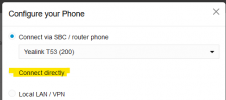
when you set up the phone on an extension how did you specify you wanted it to provision?

1723558750409.png

Choose connect directly, then go back to the event log on the front page and check that the log says it has successfully sent off an RPS.

1723558803432.png
 
I did connect directly, I will check that now.
 
It works now! Thank you very much for your help, I greatly appreciate it. Have an amazing day.
 
  • Like
Reactions: Alphabetic
Status
Not open for further replies.

Members Online Now

Forum statistics

Threads
111,832
Messages
589,283
Members
164,662
Latest member
DejanMDS