provisioning

Status
Not open for further replies.

DmitryS

Customer
Joined
Nov 28, 2023
Messages
8
Reaction score
0
I am trying to provision Yealink T42S: Factory reset, Install updated firmware, auto-provision. However the phone still says No service. Also, while I am autoprovisioning it, the 3CX does not give me an option to choose Yealink T42S out of the menu of the compatible router phones. It only has T42U phone available even though 3CX website says that T42S can be used as a router phone. I pick the T42U phone out of the menu. The phone has a line tone, but the display says No Service and there is no light at all (green or red) above the display. Your help is greatly appreciated.
 
Hi, in the guide it shows the following

Yealink T4U Series has 4 models that can be used as router phones (T42U,T43U,T46U,T48U). The firmware will need to be updated to enable the router function prior to the configuration.

It does not mention that T42S can be router phone.

You can not use the T42S as router phone using the T42U template, that is not supported, also this phone uses a different firmware version

What you are doing it not correct nor supported.

Yealink T42S uses firmware 66.86.0.5 and T42U uses 108.86.0.76 you can check the firmwares here

If you are trying to provisioning the T42S as remote then you need to pick a router phone or install a 3CX SBC and then provisioning following the steps in the guide.

Have a great day!
 
Last edited:
  • Like
Reactions: N_G
Hello,

I had some "No Service" issues lately and it was that the account NAT Rport was disabled.
In the phone web UI, go in the advanced section of the account and enable the "Rport" option (4th or 5th option if I recall correctly).
 
Hi, in the guide it show the following

Yealink T4U Series has 4 models that can be used as router phones (T42U,T43U,T46U,T48U). The firmware will need to be updated to enable the router function prior to the configuration.

It does not mention that T42S can be router phone.

You can not use the T42S as router phone using the T42U template, that is not supported, also these phone use different firmware version

What you are doing it not correct nor supported.

Yealink T42S uses firmware 66.86.0.5 and T42U uses 108.86.0.76 you can check the firmwares here

If you are trying to provisioning the T42S as remote then you need to pick a router phone or install a 3CX SBC and then provisioning following the steps in the guide.

Have a great day!
Thank you
 
This is not re-written by the daily autoprovisionning of the phone. So unless you factory default the phone, it will still stay on Enabled.
 
Hello,

I had some "No Service" issues lately and it was that the account NAT Rport was disabled.
In the phone web UI, go in the advanced section of the account and enable the "Rport" option (4th or 5th option if I recall correctly).
Thank you
 
1709072482497.png
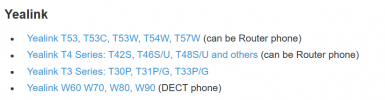
looks like it can be to me. i too made the mistake.....
 
  • Like
Reactions: EmmettsIT
Status
Not open for further replies.

Members Online Now

Forum statistics

Threads
111,832
Messages
589,283
Members
164,662
Latest member
DejanMDS