Push notifications don't work

glapin

Premier Customer
Joined
Nov 18, 2026
Messages
5
Reaction score
0
Hello!
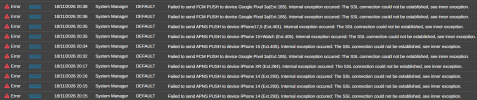
We got a lot of alerts in our system:
1795020053117.png
There're no notifications to ios and Anroid devices.
Restarting services and server didn't help. Firewall cheking all green.
 
Hi @glapin, is this machine running self-hosted or on premise? could you please disable the IPv6 on the NIC and also from the advanced menu --- network settings, then restart the sip service and perform a new test.
 
Self hosted, ipv6 disabled on both ports, "Automatically bind to ipv6..." also disabled
 
Is firewall checker passing?
 
Please check the NIC via command line and make sure the inet6 is not assigning any IPv6 address.

Then you can start a packet capture in the pbx, replicate the issue, validate that DNS is working properly and filter the capture to the IPs used to connect with the PUSH services.

There you can see if there are any reset connections, and packets that are not getting any response.
 
Please check the NIC via command line and make sure the inet6 is not assigning any IPv6 address.

Then you can start a packet capture in the pbx, replicate the issue, validate that DNS is working properly and filter the capture to the IPs used to connect with the PUSH services.

There you can see if there are any reset connections, and packets that are not getting any response.
I'm not very good with wireshark, i see no traces of ipv6.
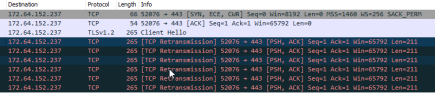
I found packets to pbxservicespush.3cx.com:
1795022826602.png
 
Second interesting thing is that our system cannot find any updates after reboot (we're on update 9 yet).
 
OK @glapin you can see in your capture the packet retransmissions to the domain pbxservicespush.3cx.com because the client never receives an ACK or Server Hello back, it repeatedly resends the exact same Client Hello segment (Seq=1 Ack=1 Len=211) until the connection times out.

You need to check the Firewall, review if there is any Web Filter, or Deep Packet Inspection (DPI) Blocking, its clear that the connection is not being allowed, the same could be occurring with the domain downloads-global.3cx.com, 443 (outbound, TCP) and that could explain why you dont see the updates..
 

Forum statistics

Threads
112,535
Messages
593,087
Members
165,747
Latest member
Hugh_Wilson