Push on 3cx android app

Status
Not open for further replies.

saba

Bronze Partner
Advanced Certified
Joined
Mar 18, 2015
Messages
52
Reaction score
11
Hi

the setup : 3cx linux on hyper v (i follow the hyper v prerequisite)
some Yealink desktop phone
some windows webclient
some iPhone 3cx app
some android 3Cx app only on wifi (no 4g network)

My issue is on Android phones, the push work when he want.
if the push don t work and i open the phone and 3cx app i can take the incoming call

i tried to disable all power management on Gigaset GX290 andoid Phone, set wifi as no billable connection, no power optimisation on 3cx app but stilll the issue.
I have also delay when the push work.

i stuck...

Thanks for help.
 
Last edited by a moderator:
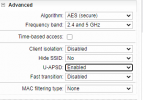
i just found a wifi setting on the controler > U-APSD
perhaps when power saving the phone doesn't respond to the push...

1619115917822.png
 
Hi saba,

same issue here. U-APSD is already disabled. But the issue occurs also in the homeoffices. Could not find a solution yet. ipv6 on the 3cx instance (running in Google Cloud) is also disabled. :(

Tobias
 
Please provide the information mentioned here: https://www.3cx.com/community/threads/every-new-post-must-contain.20492/

Also,
• Is the android device not receiving the call unless you start the app up? Does this happen for every call?
• Does this happen with other android devices on this 3CX PBX too(other models)?
• Does this happen if you connect the android device to LTE as well?
 
  • Phone Model: Gigaset GX290
  • Android Version: [Android 10]
  • App Version: [16.6.2.89]
  • 3CX PBX Version: [V16 Update 7 (16.0.8.9)] / [Debian]
  • Network Connection: [WiFi] / [IPv4]
  • Client is on the same network as the PBX

• Is the android device not receiving the call unless you start the app up? not alway
Does this happen for every call? no
• Does this happen with other android devices on this 3CX PBX too(other models)? I will try to do a test
• Does this happen if you connect the android device to LTE as well? I will try to do a test
 
Last edited:
  • Like
Reactions: ChrisC_3CX
Hi saba,

same issue here. U-APSD is already disabled. But the issue occurs also in the homeoffices. Could not find a solution yet. ipv6 on the 3cx instance (running in Google Cloud) is also disabled. :(

Tobias
also with Andoid phones ? with LTE/4G ?
 
Last edited by a moderator:
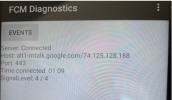
perhaps FCM issue

only connected since 01:09 min but the phone is on since many hours

1619166227208.png
 
Here are my information:

Phone Model: Xiaomi Redmi 9, Samsung Galaxy S20 + S21
Android Version: Android 10
App Version: [16.0.1.X]
3CX PBX Version: [V16 Update 8 (16.0.8.9)] / Debian
Network Connection: WiFi and LTE / IPv4
Client is on the same network as the PBX or not? No

• Is the android device not receiving the call unless you start the app up? Does this happen for every call?
It differs. Sometimes the user has to restart the app several times for getting incoming calls again. Sometimes, when the user notice the call in the web extension and he starts the not ringing app the call is coming to the app.

• Does this happen with other android devices on this 3CX PBX too(other models)?
See infos above.

• Does this happen if you connect the android device to LTE as well?
Yes.


We will check the link for push issues sohrtly.
 
@saba, your FCM connection time observation is relevant as the connection to the device connection to Googles's FCM service should not be disrupted for Push notifications to work properly. Things to check:
(a) Try our recently released beta app and let us know if the issue still occurs. Check if there is a difference when the device is connected via WiFi or data connection.
(b) Verify that your network and device connectivity satisfies Google's FCM requirements - FCM connections should be kept uninterrupted.
(c) If the issue can still be reproduced after you check the above, PM me to troubleshoot further.

@tol you can also use the above check list. Note, that during our tests we have verified that some Xiaomi devices employ aggressive power-management methods, e.g. terminating apps and connections a few minutes after locking the device - see also here for more info.
 
Last edited by a moderator:
Energy settings and permissions are already at the recommended settings. We will try additional the app locking now.
Thank you.
 
  • Like
Reactions: KyriakosP
So i saw in FCM that it try to connect through port 5228, since i allow this outgoing conection in FW it seems working fine...
 
Last edited:
Status
Not open for further replies.

Members Online Now

Forum statistics

Threads
111,832
Messages
589,284
Members
164,662
Latest member
DejanMDS