Solved Q call back is not working

Status
Not open for further replies.

Alphabetic

3CX MVP
Silver Partner
Advanced Certified
Joined
Jul 1, 2016
Messages
6,571
Reaction score
2,582
Ive got a queue with one agent in (testing)

I call in, enter my call back number and go.

Agent is available and I can see that the QCB is calling the Q but the agent isnt being called.

PBX is on premise, passing firewall tests, correct outbound rules are set.

another thing I notice which may be unrelated is that the audio on the IVR and MOH is choppy.

i've got it scheduled for a reboot.
 
Hi @kieferschild,

If you test by making an internal call and not changing the QCB number, leaving it the default 2* scenario, does this call the agent?

What hypervisor are you using? What OS is it running? What are the resources that you've allocated the VM?
 
Hi @kieferschild,

If you test by making an internal call and not changing the QCB number, leaving it the default 2* scenario, does this call the agent?

What hypervisor are you using? What OS is it running? What are the resources that you've allocated the VM?
Hi

I've noticed this VM is under powered and is causing us some audio issues too so until I sort that i'm going to put this on hold as I suspect the two are related.
 
Hi @kieferschild,

Sure thing, let me know if it's still an issue once you've tested!
 
Increase resources and fixed the audio issue.

Removing prefix from QCB allows the call back to happen but I need an indication for the agent.

I changed it to *2 and it works too. Is there a limit for outbound rules? I had it using 888 but apparently it didnt like it.

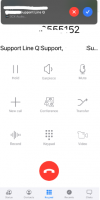
Also, if agent is looking at their 3CX app and a QCB calls them it looks like they've answered it when they actually havent.

to answer the call i have to press the tiny button at the top.

1624636739376.png
 
Ok changed it to 444 and that works now.
 
  • Like
Reactions: VasilisV_3CX
Status
Not open for further replies.

Forum statistics

Threads
111,974
Messages
590,081
Members
164,899
Latest member
mazet