Solved QR code for a new user on SMB10

Status
Not open for further replies.

AWS2P

Silver Partner
Advanced Certified
Joined
Jan 9, 2014
Messages
5,076
Reaction score
1,096
Hi,
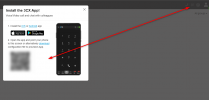
I just started my first SMB10 PBX yesterday and I was lost with basic things like, how to find the QR code to add an App extension ?
Have found the one from the owner of the pbx but never found where to get the QR from the new user added.

What is the way is SMB to provision Apps for users added ?
 
Did the user access the Web Client to get access to the QR code?
1700208401238.png
 
Steps i did
from the owner of SMB, i create a new user and then searched for QR code to provision Android App.
To get the similar view you pasted I need to be already logged as the new extension ? or is it possible to see that from the owner extension ?
If so , i didn't found how to so it is what i'm asking here.

they don't use Webclient, but if they do how to connect with a new user? where is the password for the webclient?
Is there some 3CX docs HOW TO dedicated to SMB?
 
Each user needs to access to his web client in order to get the QR code. The system owner does not have access.
 
Each user needs to access to his web client in order to get the QR code. The system owner does not have access.
Ok so the login is the extension number but where I get the password to log in webclient ?
 
What exactly you mean password to log?
 
I got it :)
Did the lost password process
 
Glad to know ;)
 
  • Like
Reactions: AWS2P
Status
Not open for further replies.

Members Online Now

Forum statistics

Threads
111,831
Messages
589,277
Members
164,660
Latest member
RJenkinsROCK