Query on High Availability for 3CX Enterprise on-premise PBX

Status
Not open for further replies.

Kwang Mien

Silver Partner
Advanced Certified
Joined
May 14, 2020
Messages
255
Reaction score
17
Hi All,

We have requirement for setting up an on-premise phone system for 1200 users.

We are looking at using 3CX on-premise PBX loaded with 3CX Enterprise license with 256 SC. High Availability for the 3CX on-premise servers would be required.

I understand from the URL below that for HA for 3CX Enterprise to work, the phones will register by FQDN to the 3CX servers.
https://www.3cx.com/docs/failover/

Will this HA feature still work if the 3CX servers are on-premise (they are having local IP address and behind firewall) ?

Regards,
Kwang Mien
 
Hi All,

We have requirement for setting up an on-premise phone system for 1200 users.

We are looking at using 3CX on-premise PBX loaded with 3CX Enterprise license with 256 SC. High Availability for the 3CX on-premise servers would be required.

I understand from the URL below that for HA for 3CX Enterprise to work, the phones will register by FQDN to the 3CX servers.
https://www.3cx.com/docs/failover/

Will this HA feature still work if the 3CX servers are on-premise (they are having local IP address and behind firewall) ?

Regards,
Kwang Mien
Yes, as long as you are using split dns (so phones still use the FQDN but inside the network it resolves to the local IP of the 3CX server).

It will be necessary for you to automate the update of the internal dns entry - see the bottom of that page, specifically:

Custom Failover Usage​

For Failover use with custom FQDN and LAN-to-LAN or LAN-to-Cloud scenarios, to update your DNS and FQDNs when failover occurs, you need to use advanced scripting and services like Active Directory to run shell scripts with administrative privileges.

You can find sample scripts for Windows-based machines here.

Some scripts might need to run under impersonated user accounts. To achieve this you need to follow additional steps documented here.
 
  • Like
Reactions: Kwang Mien
Yes, as long as you are using split dns (so phones still use the FQDN but inside the network it resolves to the local IP of the 3CX server).

It will be necessary for you to automate the update of the internal dns entry - see the bottom of that page, specifically:

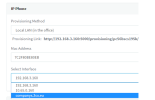
Thanks for the info. In the case when there are remote phones as well, 2 FQDN are needed, i.e. internal FQDN (resolves to local IP) and public FQDN (resolves to public IP Address).

During 3CX installation, only the public FQDN is configured. However, for the on-premise phone provisioning, we need to select the internal FQDN which does not appear in the 3cx phone provisioning as shown below.

How can we configure the internal FQDN in 3cx provisioning ?

1680697017488.png
 
internal FQDN (resolves to local IP) and public FQDN (resolves to public IP Address).
There is no "internal FQDN"...this is the reason for split DNS so hosts on LAN resolve it to the internal IP address. See https://www.3cx.com/docs/creating-fqdn-split-dns/. "If you are installing 3CX on-premise, you must configure an FQDN that resolves both externally (from outside your network) and internally (within your local network)." Note that doc says split DNS is also called "hairpin NAT" which most would say is incorrect.

Another option is to let the FQDN resolve to your WAN IP, and use NAT reflection/hairpinning to route the traffic back in to 3CX. However that sends ALL phone/app traffic from LAN through the router.
 
Steve is correct - you use the same FQDN for both internal and external and you instead serve the private IP from the internal DNS servers and the public IP for anything external.
 
There is no "internal FQDN"...this is the reason for split DNS so hosts on LAN resolve it to the internal IP address. See https://www.3cx.com/docs/creating-fqdn-split-dns/. "If you are installing 3CX on-premise, you must configure an FQDN that resolves both externally (from outside your network) and internally (within your local network)." Note that doc says split DNS is also called "hairpin NAT" which most would say is incorrect.

Another option is to let the FQDN resolve to your WAN IP, and use NAT reflection/hairpinning to route the traffic back in to 3CX. However that sends ALL phone/app traffic from LAN through the router.
Thanks for the clarification. For the 2nd option of using FQDN to resolve to WAN IP, the traffic can bw routed to 3cx. However, for the return path of 3cx back to the phone, the source IP will be private IP of the 3cx. When the phone receives the call, it will probably drop the call as it is not from the public IP address of 3cx. Is that correct ?
 
For the 2nd option of using FQDN to resolve to WAN IP, the traffic can bw routed to 3cx. However, for the return path of 3cx back to the phone, the source IP will be private IP of the 3cx. When the phone receives the call, it will probably drop the call as it is not from the public IP address of 3cx. Is that correct ?
That's not correct. It will actually not drop it, the traffic will pass back and forth via the public IP always because it passes through NAT. This can break at any moment depending on what the firewall does, or if you need to replace it. But avoid this 2nd option, it's not a very good solution to consider.

Especially since you will build this new system from the ground up and you can use Split DNS to do it right from the beginning.
 
  • Like
Reactions: Kwang Mien
I have a question regarding the split DNS used for 3cx failover.

In the event of 3cx failover happen, does the standby 3cx only update the FQDN (for external) to its IP address.
For the internal resolution of the FQDN, do we need to manually point the FQDN to the standby 3cx server IP ?
 
I have a question regarding the split DNS used for 3cx failover.

In the event of 3cx failover happen, does the standby 3cx only update the FQDN (for external) to its IP address.
For the internal resolution of the FQDN, do we need to manually point the FQDN to the standby 3cx server IP ?
Yes.

Sample scripts are provided in the 3CX docs for Windows DNS servers, although they are quite dated.
 
  • Like
Reactions: Kwang Mien
Status
Not open for further replies.

Forum statistics

Threads
111,974
Messages
590,081
Members
164,899
Latest member
mazet